Decapitator is an analog saturation modeler plug-in that infuses tracks with the natural vibe of hardware, offering five distinct models and a range of controls to shape and push sounds.
Purpose and Models
Decapitator brings the character of analog saturation into a digital studio. It is built on the idea that tubes, transistors, and circuitry, when pushed, create a musical sound. The plug-in offers five different saturation models, each painstakingly created from vintage and modern hardware consoles, preamps, EQs, compressors, and distortion units.
These models are designed to react dynamically, following the track and instrument rather than being a static snapshot. This captures the feel of analog gear, making the sound change subtly as the input changes. Each model has a unique character, working both in subtle settings and when driven to extremes.
Key Capabilities
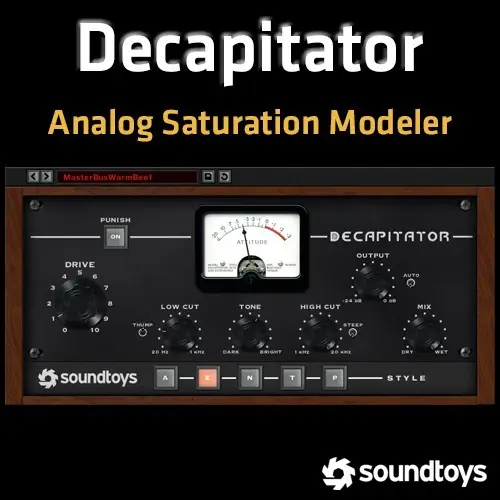
Decapitator includes several controls to shape the saturated sound. An analog-modeled tone control lets you adjust the contour of the saturation, tailoring the frequency balance to your liking. A mix knob allows you to blend in the dry signal, creating parallel processing effects without complex routing.
The Punish button adds an extra chunk of gain to push the effect over the edge. When driven hard, the plug-in reacts like analog gear, producing a screaming sound that is not fizzy or like stomp-box distortion, but rather the unique quality of high-end studio gear being overdriven.
Workflow and Controls
Using Decapitator is straightforward. You select one of the five saturation models to set the tonal character. Then you adjust the input drive to control how much saturation is applied, from subtle warmth to extreme distortion. The tone control further shapes the sound, and the mix knob lets you blend the processed and dry signals.
You can use the Punish button to immediately add more gain for aggressive sounds. The controls are designed to work intuitively, allowing you to dial in a sound quickly. The plug-in is suitable for a wide range of audio material, from individual tracks to full mixes.
Practical Applications
Decapitator is versatile for mixing and sound design. Use it on vocals to add presence and edge, on drums to add punch and grit, or on guitars and synths to create character. It can beef up tracks that sound too thin or add warmth to digital recordings. The subtle settings are good for gluing mixes together.
For more extreme results, the Punish button can push sounds into overdrive, giving them a screaming quality. The mix knob is useful for parallel compression-style effects, blending the saturated signal with the original. It is ideal for any track that sounds too polite and needs a bit of attitude.
Key features
- Five analog saturation models based on studio hardware
- Punish button for extra gain and overdrive
- Analog-modeled tone control for shaping saturation
- Mix knob for parallel processing without routing
- Dynamic response that follows the input signal
Best for
Decapitator is best for adding analog-style saturation and distortion to vocals, drums, guitars, synths, and full mixes. It works well for both subtle warmth and extreme overdriven sounds, making it a solid choice for producers and engineers seeking to inject character into their recordings.