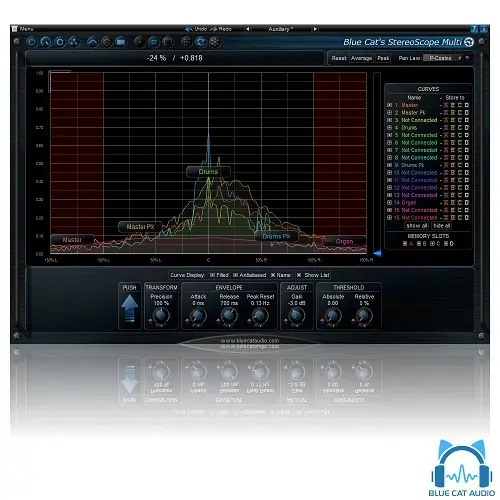
Blue Cat Audio StereoScope Multi is a real-time multi-track stereo field analyzer for mixing and mastering, displaying up to 16 curves to compare stereo images across tracks or within an effect chain.
Purpose
StereoScope Multi is designed for mixing and mastering engineers who need to see how each instrument occupies the stereo field. It displays the stereo image of multiple audio tracks simultaneously on a single graph, using the same analysis algorithms as the StereoScope Pro plugin. This allows you to identify frequency overlaps or phase issues between tracks.
The tool also analyzes an entire effect chain, showing how each effect alters the stereo image of your content. It supports instant, peak, and average response curves for each track, and you can save curves for A/B comparison. This makes it a practical choice for checking mono compatibility and phase cancellation across a mix.
Key Capabilities
The plugin supports up to 16 curves on the same graph, with animated zoom and precise measurement capabilities. It uses a unique data-sharing technology that leverages multi-core processors for efficient real-time analysis. You can compute the difference between curves to measure response variations easily.
Each track can have its own settings thanks to advanced routing options, so you can adapt parameters per audio signal. The user interface includes opacity control, custom absolute and relative threshold settings, and full MIDI control with automation and MIDI Learn support. The plugin also features smooth bypass for noiseless activation and deactivation.
Workflow
To use StereoScope Multi, insert it on a track or bus and route the audio signals you want to analyze. You can then adjust the view to display multiple curves, using zoom and coordinates to measure stereo field characteristics precisely. The plugin’s interface can be customized with Blue Cat’s skinning language and window opacity management.
For effect chain analysis, place the plugin after the effects you want to examine. The saved curves feature allows you to capture a reference and compare it with later changes. The plugin shuts down processing when fed with silence, reducing CPU load during idle periods. It supports any sample rate and is available in most plugin formats for Mac and Windows.
Practical Applications
In mixing, use it to see which instruments occupy the same stereo position, helping you make EQ or panning decisions to avoid clutter. For mastering, it helps verify that the stereo image is consistent across the entire mix. It is also useful for detecting mono compatibility issues before finalizing a track.
The difference curve feature is handy for comparing the effect of a plugin on the stereo image. The plugin’s ability to handle multiple tracks simultaneously makes it ideal for comparing different takes or versions of a mix. It is a diagnostic tool rather than an effect, so it fits into any session where visual analysis is needed.
Key features
- Real-time multi-track stereo field analyzer with up to 16 curves
- Displays instant, peak, and average response curves
- Compute difference between curves for measurement
- Animated zoom and precise measurement capabilities
- Save curves for A/B comparison
- Opacity control and customizable interface
- Supports MIDI Learn and automation
Best for
StereoScope Multi is best for mixing and mastering engineers who need to visualize and compare the stereo image of multiple tracks or an effect chain. It is ideal for identifying phase issues, mono compatibility problems, and frequency overlaps, making it a valuable tool for detailed mix analysis.