EXPOSE 2 is a standalone audio quality control app that analyzes your music for technical issues like clipping, phase problems, over-compression, and tonal imbalance, offering clear feedback for release-ready masters.
Purpose
EXPOSE 2 is a standalone audio quality control application designed to help music producers, engineers, and artists identify technical issues in their tracks before distribution. It targets common problems that can degrade the listening experience, such as poor EQ balance, true peak clipping, over-compression, and phase issues.
By providing a clear analysis of your audio, EXPOSE 2 aims to reduce the risk of releasing music with these flaws. The app gives you insight into whether your track might have problems on streaming platforms, club systems, CDs, or other playback environments.
Key Capabilities
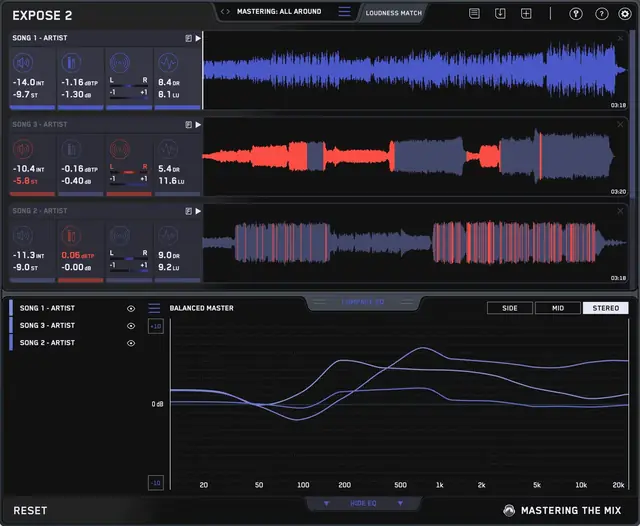
The application measures four key aspects of your audio: loudness, peaks, stereo/phase information, and dynamic range. You can loop specific sections of a track to focus on those parts. If an issue is detected, the corresponding section icon turns red, and you can click it to isolate the problem on the waveform, showing exactly where it occurs.
For tonal balance, EXPOSE 2 provides a Compare EQ that shows how your track’s average tonal balance compares to a reference track you import, or to genre-specific presets created using sonic profiles from commercially successful tracks. Differences within +/-3 dB indicate a very similar balance, while over +/-6 dB suggests a considerable difference.
Workflow
Using EXPOSE 2 is straightforward. Open the standalone app, drag and drop your audio file onto the dashboard, and select a preset that matches your distribution method—such as Spotify, YouTube, or CD. You can also load a reference track to compare tonal balance. The analysis runs in about three seconds.
After the initial check, EXPOSE 2 provides specific feedback on how to resolve any issues and optimize your music for release, typically within your DAW. You can preview the audio and use the Loudness Match feature to normalize all tracks to the same perceived volume, making comparisons fair and unbiased.
Practical Applications
EXPOSE 2 suits any music producer or mixing engineer who wants to ensure their tracks meet technical standards before they go live. It’s especially helpful for those releasing to streaming services, where loudness normalization and peak limits are critical, or for club-focused masters that need high loudness without distortion.
The app helps you achieve technical goals, whether you aim for a extremely loud club master or want your music to sound great on streaming. By identifying issues early, it supports a more confident release process and can improve the overall listening experience for your audience.
Key features
- Identifies EQ balance, true peak clipping, over-compression, and phase issues
- Offers genre-specific tonal balance presets from commercially successful tracks
- Compare EQ allows reference track import for tonal balance comparison
- Detailed readings for loudness, peaks, stereo/Phase, and dynamic range
- Issue isolation on waveform and guided resolution feedback
- Loudness Match for unbiased comparison between tracks
- Standalone application, no DAW required
Best for
Best for music producers, mixing engineers, and artists who want to verify their tracks are technically ready for distribution across streaming, club, and CD platforms. It offers a quick, user-friendly way to catch common mastering issues before final release.