Strata is a spectral analysis tool that visualizes the frequency content of every track in your mix as geological layers, helping you spot clashes, masking, and mud quickly.
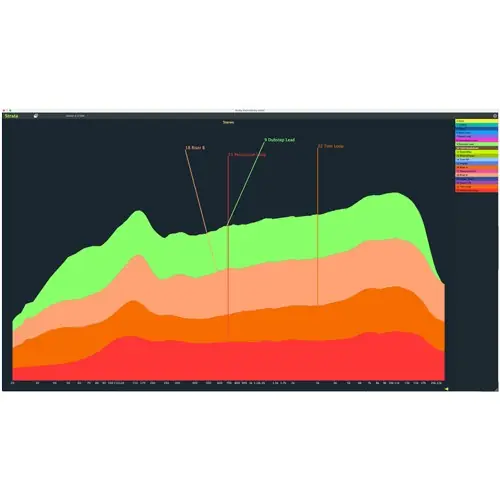
Spectral Visualization
Strata Standard by Crickets Audio offers a fresh approach to mix analysis by displaying the frequency spectrum of every track in your project as a single, layered graph. This ‘X-ray’ view lets you see the entire musical arrangement at a glance, making it easy to identify which elements occupy the low end, mids, or highs.
The interface is designed to immediately reveal common mix problems: you can spot which tracks are muddying the low end, which synths extend into the high hat frequency range, and which mid-range elements are too loud. This static overview simplifies the process of detecting frequency clashes and masking before you even start tweaking.
Simple Two-Plugin Workflow
Strata’s workflow is straightforward and requires only two plugins. You place the Strata Track plugin on each audio track in your project, then insert the Strata Vision plugin on any single track and open its window. The Vision plugin aggregates the data from all Track instances and renders the combined spectral graph.
There is no complicated routing or bus setup needed; the plugins communicate automatically within your session. This drop-and-look approach means you can set up Strata quickly on an existing mix and immediately see the complete frequency picture, without disrupting your current signal flow or adding extra processing to your chain.
Customizable Display
Strata gives you control over how the spectral information is presented. You can choose from a range of graph color palettes, or you can import your DAW’s track colors automatically. This color integration works with Ableton Live, Bitwig Studio, Cubase, FL Studio, and Reaper, helping you visually match the graph to your session.
The display window is resizable to any shape—large, small, tall, or wide—and Strata automatically adjusts its spacing, line widths, and font sizes to fit the chosen dimensions. This flexibility lets you optimize the graph for your screen real estate and workflow, whether you prefer a compact overview or a expanded, detailed view.
Practical Applications
Strata is designed for mixing and production tasks where visual feedback speeds up decision-making. Use it to check the balance of your low end, verifying that the kick and bass are not fighting for the same frequencies. You can also see if a pad or synth is masking the vocals in the mid-range.
The tool is useful during arrangement, helping you spot when a new part enters and whether it collides with existing elements. By watching tracks appear and disappear in the graph, you can make informed decisions about EQ, level balancing, and even song structure. This makes Strata a handy reference for both mixing and sound design sessions.
Key features
- Visualizes frequency spectrum of all tracks in one graph
- Simple two-plugin setup: Track and Vision
- Identifies low-end mud, masking, and level imbalances
- Color palettes and DAW track color import (Ableton, Bitwig, Cubase, FL Studio, Reaper)
- Resizable window with adaptive spacing and font sizes
Best for
Mixing engineers and producers who want a quick visual overview of frequency clashes, masking, and level issues across a full session, especially in pop, electronic, or hip-hop productions where dense arrangement clarity is critical.