Claro is a three-stage equalizer from Sonnox designed to streamline music production from initial creative shaping to detailed mixing, featuring an adaptive spectrum analyzer and unique auto gain.
Purpose and Stages
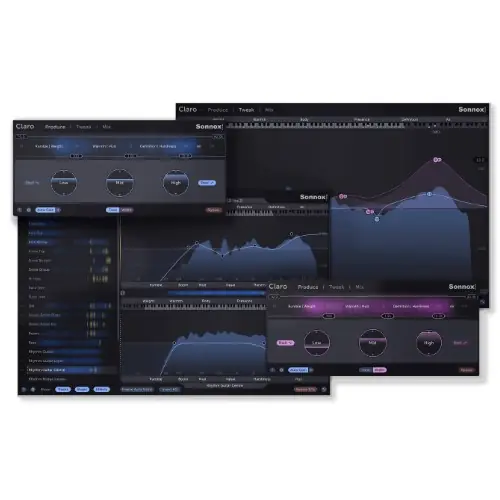
Claro is an EQ plugin that supports the entire production process, from composition to final mix, by offering three distinct views: Produce, Tweak, and Mix. Each view progressively provides more detail and control, helping you maintain focus and accelerate your workflow. The Produce stage is designed for quick, creative, and non-distracting equalization, encouraging instinctive musical decisions without technical clutter.
The Tweak stage builds on the Produce result, offering deeper correctional possibilities with Sonnox’s cleanest filters. The Mix stage assembles all necessary information for final mixing, displaying every track in context to help you address frequency collisions and prioritize adjustments. This structured approach aims to keep you in a creative flow while still offering precision when needed.
Key Capabilities
A standout feature is Claro’s auto gain, which works differently from typical EQs by maintaining consistent loudness regardless of how you shape the track. This allows you to EQ for tone and use faders for volume without them conflicting. Additionally, the adaptive spectrum analyzer follows the channel mode (Left, Right, Mid, Side, or Stereo) and the Q of the band you’re adjusting, highlighting resonances so you can attenuate them without sweeping manually.
The plugin supports mid-side EQ for cleaning up stereo synths and loops, with a Width mode to visualize side-channel energy. It also includes smooth parameter interpolation to minimize zipper noise and artifacts during automation. The multitrack workspace shows all Claro instances across your project, revealing how tracks interact and mask each other, with drag-and-drop to explore EQ moves across combinations.
Workflow
Claro’s workflow is built around maintaining creative flow. In Produce mode, you focus on tonal characteristics and energy rather than the EQ curve, making quick adjustments. When you need finer control, switch to Tweak mode to adjust filter resonance, left/right and mid/side balance, or attenuate resonant areas that cause boxiness. The analyzer adapts to your moves, supporting precise sculpting without breaking your concentration.
For mixing, the multitrack workspace is central. You can see all Claro instances across the project, identify where tracks compete for space, and drag-and-drop to test remedial EQ moves. Yellow areas highlight interactions that may cause boominess or muddiness. This approach encourages making informed decisions by seeing the whole mix context, rather than isolated tracks.
Applications
Claro suits producers who want to build EQ intuition without interrupting their creative flow. Its Produce mode is ideal for initial tone shaping during composition, while Tweak offers deeper correction for resonances and stereo width. The mid-side EQ is particularly useful for cleaning up stereo synths and loops, letting you center the bass and spread the air, but with control over how much you apply.
In mixing, the multitrack workspace helps you refine a mix through minor tweaks around lead elements, addressing masking and frequency collisions. The auto gain is valuable for maintaining consistent loudness, preventing boosting from unbalancing your mix. It’s best for those who want to make musical decisions based on sound rather than visual curves, and who value a streamlined, context-aware EQ for both creative and technical tasks.
Key features
- Three distinct views: Produce, Tweak, and Mix
- Adaptive spectrum analyzer for resonance identification
- Unique auto gain to maintain loudness
- Mid-side EQ with Width mode
- Smooth parameter interpolation to reduce artifacts
- Multitrack workspace for visual track interaction
Best for
Claro is best for producers and mixing engineers seeking an EQ that integrates creativity with precision. It excels in workflows that benefit from visual context across tracks, frequent mid-side adjustments, and a desire to avoid loudness conflicts. Ideal for those who prefer intuitive sound-first decisions but need technical tools for resonance control and mix balancing.