VoiceAssist Advanced automates routine vocal and dialogue cleanup using ARA analysis. It generates editable automation for leveling, noise control, breaths, sibilance, and low-end stabilization, aiming to provide a workable starting point while retaining manual control.
Purpose and Core Concept
VoiceAssist Advanced is a vocal and dialogue processor that uses ARA analysis to generate automation for repetitive tasks. It is designed to address common issues across takes, comps, and location sound, giving you a more workable starting point without introducing artifacts. The goal is to reduce time spent on corrective work, allowing you to focus on tone and performance.
Its workflow is based on content-aware processing that detects voice and silence, generating automation you can edit directly. Manual adjustments remain intact even if you change settings. The plug-in operates in ARA or standalone mode, and can export automation and environment noise for use in other sessions.
Noise, Dynamics, and Gate
Clean Tools handle background build-up and room reflections, while Recover Highs restores detail in takes that have softened through distance or earlier processing. The Dynamics section writes level automation that is fully editable, with LUFS I and LUFS S targets plus a Catch Peaks control for transient spikes.
The Gate section uses adjustable boundaries to manage noise floors across changing environments or mic positions. It is content-aware, automatically detecting voice and silence without a threshold, though you can switch to a traditional threshold-based approach. This non-aggressive gate avoids hard cuts, keeping consistency for later stages.
Breaths, Sibilance, and Low-End Control
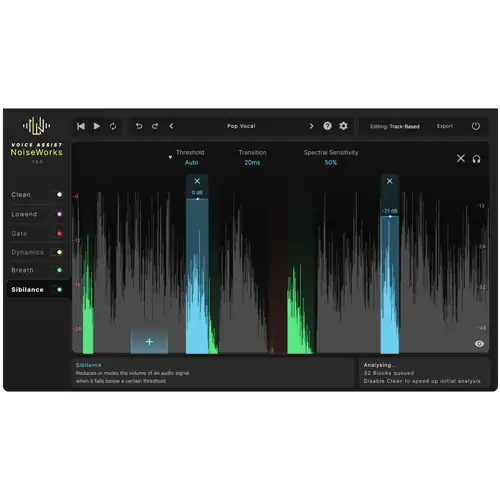
Automatic detection of breaths and sibilance reduces harshness, with each having its own editable boundaries so processing follows the material. The Sibilance section includes Spectral Sensitivity to address harshness within the sibilant itself without flattening consonants.
The Low-End section stabilizes low frequencies across sections and takes, adding weight when thin and taming excess energy. Resonant Reduction identifies narrow peaks for control without manual hunting. Low-cut options include a fixed filter, a pitch-based mode that adapts to the performance, and a dynamic mode for varied material.
Workflow and Applications
VoiceAssist is built for professionals who work on vocals or spoken word frequently. It automates the essential but boring parts of the job, saving hours when working under tight budgets and deadlines. It suits music producers mixing stacks of takes, dialogue editors dealing with material from different rooms, and podcast editors preparing large volumes of speech.
Hybrid workflows benefit because automation stays intact when moving between DAWs or editors. It is also useful for re-record mixers wanting cleaner stems before reaching the stage. By providing predictable, editable results without long chains of corrective plug-ins, it fits facilities where sessions shift between different environments.
Key features
- ARA analysis generates editable automation
- Clean Tools for background and room handling with Recover Highs
- Content-aware gate with adjustable boundaries and manual threshold mode
- Editable level automation with LUFS I and LUFS S targets and Catch Peaks
- Breath and sibilance detection with Spectral Sensitivity
- Low-end stabilization, Resonant Reduction, and pitch-based low-cut modes
- ARA and standalone operation with automation export
Best for
Best for music producers, dialogue editors, and podcast engineers who need to streamline vocal prep. Ideal for those working with large volumes of takes, location sound, or multi-room recordings, wanting fast, editable results without sacrificing manual control. Suited for hybrid DAW workflows where automation portability matters.