Eigen is a reflection processing multitool from Lese, offering real-time early reflections, offline reverberant impulse response rendering, and room resonance analysis using a simplified acoustic simulation engine.
Purpose and Modes
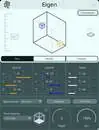
Eigen is a reflection processing multitool built around Lese’s Impulse Engine. It provides three distinct modes: Play, Render, and Analyze. Play performs accurate early reflection processing in real time. Render computes high-quality reverb impulse responses for external convolution reverbs. Analyze checks how sound resonates against a virtual space, focusing on low-end room modes.
The acoustic simulation is simplified for ease of use, but can be more detailed with the Use High Quality Materials setting. In that mode, each reflection is split into ten frequency bands and processed individually according to real-world material responses. Real-time processing with such detail is not possible on consumer computers, so tradeoffs are made.
Key Capabilities
Play mode allows real-time early reflection processing with a knob for reflection depth and a 3D object positioner to set sound source and listener positions. You can change the viewing angle for better control. This mode supports mono, stereo, and ambisonic low/high quality spatial settings, offering flexibility for different projects.
Render mode creates reverb impulse responses in the background using your chosen dimensions and material settings. You can set reflection depth, toggle realistic material processing, and add accurate late reflections. The output can be saved and used in external convolution reverbs, or you can preview the convolved sound directly within Eigen.
Workflow and Analysis
Typical workflows involve using Play mode for quick spatial adjustments, Render mode for offline high-quality reverb generation, and Analyze mode for understanding low-frequency resonances. You can set up a virtual space in Play, then switch to Render to create an impulse response for a convolution reverb. The Analyze mode uses current Play settings to show how the room would resonate.
For real-world spaces, you can input the dimensions of an actual room to perform resonance analysis on that space. This makes Eigen useful for acoustic planning or recreating specific environments. The Analyze mode visualizes which low-end frequencies are emphasized or nullified, helping you make informed decisions for sound design or mixing.
Applications and Practical Use
Eigen suits audio professionals needing accurate early reflections in real time for spatial audio projects, including ambisonic content. For music production, Render mode can generate custom reverb impulse responses tailored to virtual spaces, which you can load into convolution reverbs. Analyze mode aids in evaluating bass response in designed spaces.
The use of frequency-aware materials for each room surface in Render mode adds realism to offline impulse responses. The ability to save outputs allows you to build a library of reverb responses for later use. The playback preview within Eigen helps in quick assessment before exporting.
Key features
- Three modes: Play, Render, Analyze
- Real-time early reflection processing in Play mode
- Offline generation of reverb impulse responses
- Use High Quality Materials setting for ten-band frequency processing
- Supports mono, stereo, and ambisonic spatial settings
- Room mode analysis for low-frequency resonance
- Impulse responses can be saved for external convolution reverbs
Best for
Eigen is best for audio engineers and sound designers who need precise spatial reflection control, custom reverb impulse responses for convolution, and low-frequency room analysis—especially in surround or ambisonic workflows.