McDSP Channel G Native v7 is a console-style channel strip bundle with three plug-ins: G Dynamics, G Equalizer, and G Console.
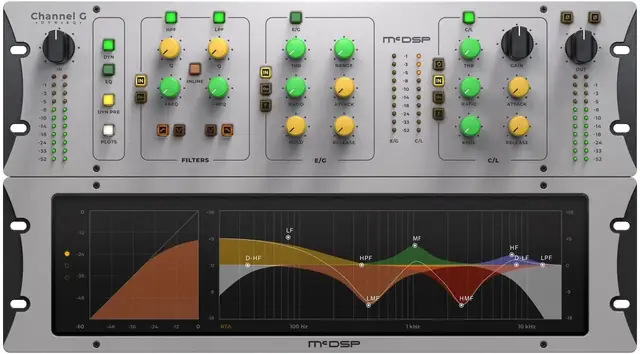
Purpose and Design
Channel G Native v7 emulates the sound of large-format analog mixing consoles, aiming to bring the ‘big board’ character into a digital audio workstation. It integrates with Digidesign D-Control and D-Command control surfaces for a tactile mixing experience. The bundle offers three distinct configurations: G Dynamics, G Equalizer, and G Console, granting flexibility depending on the processing needed.
All configurations include calibration modes tailored for music production, post production, and emulations of renowned analog desks. Each mode adjusts the behavior to suit the material, providing a versatile tool for engineers working across different genres and delivery formats.
Processing Components
G Dynamics is a full-featured dynamics section combining an Expander/Gate, a Compressor/Limiter, and a versatile filter section. The filters offer high-pass, low-pass, and notch modes with selectable slopes from 6 to 24 dB per octave. This allows precise control over frequency content before or after the dynamics, enhancing both gating and compression action.
G Equalizer is a professional-grade five-band console-style EQ with both shelving and parametric bands. It shares the same filter section for additional frequency shaping. The compressor/limiter can operate pre- or post-EQ, enabling different tonal and dynamic interactions depending on the order chosen.
Workflow and Flexibility
The plug-ins feature analog saturation modeling to add warmth and harmonic color, plus double precision processing for internal accuracy. Ultra-low latency design ensures the plug-ins are suitable for tracking and live use. They are available in mono and stereo formats, making them adaptable to various channel types and bus configurations.
Calibration modes let you tailor the response to specific tasks: music mixing, post production, or to mimic the tonal behavior of classic mixing consoles. This simplifies switching between different working contexts without needing to re-adjust the entire processing chain.
Applications
Channel G can serve as a primary channel strip on individual tracks, providing EQ and dynamics in one insert. The G Console configuration combines both components, reducing plugin count and streamlining sessions. For bus processing, the stereo version supports group compression and EQ shaping across multiple tracks.
The pre/post EQ flexibility in the compressor is useful for sculpting tone before dynamics or taming peaks after EQ boosts. The filter section’s notch capability aids in removing problematic resonances. The three plug-ins allow mixing engineers to build custom chains matching the task, from simple gating to full strip processing.
Key features
- Three plug-in versions: G Dynamics, G Equalizer, G Console
- Five-band EQ with shelving and parametric sections
- Full Expander/Gate and Compressor/Limiter
- Multi-mode filters: high pass, low pass, notch
- Selectable filter slopes from 6 to 24 dB/Oct
- Analog saturation modeling
- Calibration modes for music, post, and console emulations
Best for
Channel G is suited for mixing and mastering engineers who need a flexible channel strip with analog console character. It works well on individual tracks, buses, and stems, offering EQ, dynamics, and filtering in a unified interface. The pre/post EQ and calibration modes add adaptability for various program material.