Create custom CD/DVD labels, jewel case inserts, and disc art with automatic track list import. Print on sticker stock or directly to compatible media.
Purpose and Core Use
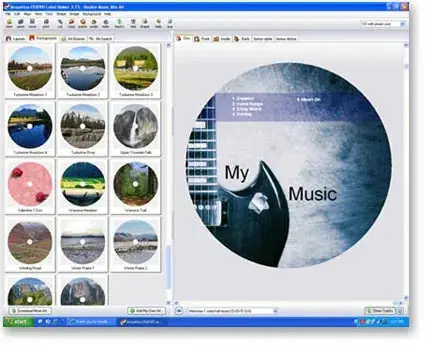
Acoustica CD/DVD Label Maker is a utility for producing printed labels and inserts for optical media. It addresses the common problem of unmarked discs by automating the inclusion of track listings on labels, making it easy to identify the contents of any CD or DVD at a glance.
The software is designed for home users and small studios that burn discs regularly and want professional-looking results without manual design work. Its workflow revolves around selecting a template, importing track data, and printing the finished label or case insert.
Track Import and Design
A standout capability is the automatic import of track information from a variety of sources, including popular media players and disc-burning applications. This eliminates the need to type out song titles manually, reducing errors and saving time, especially for discs with many tracks.
Users can also design labels from scratch, choosing from a library of pre-made designs and backgrounds for holidays and special events, or using their own artwork. This flexibility supports both quick, functional labels and more creative, personalized designs.
Printing Flexibility
The application supports printing on a wide range of media, including standard paper, sticker sheets designed for labels, and pre-perforated commercial papers. It also accommodates jewel case templates for CD, DVD, and Blu-ray cases, allowing users to produce complete disc packaging.
For those with compatible hardware, direct-to-disc printing is possible on a variety of inkjet printers from major manufacturers. Additionally, LightScribe drives can inscribe labels directly onto specially coated discs, offering an alternative to sticker-based labeling.
Workflow Steps and Practical Use
The workflow is presented in a clear sequence: design the label or cover, print the label or insert, or print directly to disc if supported. The software guides users through each stage, from selecting a design to choosing the appropriate output format.
Typical applications include creating labels for music compilations, backup discs, and video DVDs. The automatic track import is especially useful for mixed discs, ensuring that the printed insert matches the disc’s content without manual transcription effort.
Key features
- Automatic track list import from popular media players and burners
- Hundreds of built-in designs and backgrounds for various occasions
- Supports sticker labels, jewel case inserts, and direct-to-disc printing
- Compatible with many label printers and LightScribe drives
- Print on plain paper or pre-perforated commercial stock
- Create covers for CD, DVD, and Blu-ray cases
Best for
Best for home users and small studios who burn CDs or DVDs regularly and need quick, automated label creation with track listings. It’s also suitable for creating custom covers and inserts for jewel cases, and for those with compatible printers or LightScribe drives who prefer direct-to-disc labeling.