A Pro Tools spatial audio production suite with three AAX plugins, personalized HRTF monitoring, virtual studio acoustics, and multi-channel routing for mixing immersive content on headphones.
Purpose
Immerse Spatial Audio Production Suite provides a unified virtual workflow for mixing surround and spatial audio for film, television, music, and gaming directly within Pro Tools. It consolidates panning, visualization, and virtual monitoring tools, powered by the Immerse AI Engine, to simplify immersive mixing for both seasoned professionals and newcomers.
The suite addresses a common challenge: monitoring spatial audio accurately on headphones. Traditional generic Head Related Transfer Functions (HRTFs) can sound inaccurate because they do not match an individual’s unique physiology. This suite aims to solve that by creating a personalized HRTF profile from a photo of the user’s right ear.
Key Capabilities
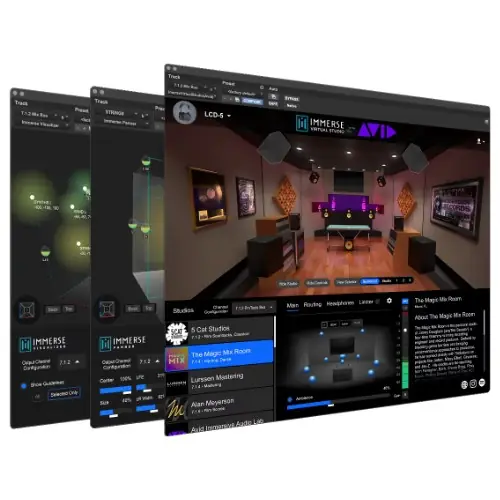
The suite includes three AAX plugins. The Immerse Panner allows panning mono or stereo sources in an intuitive 3D interface, supporting a wide variety of multichannel output formats. The Immerse Visualizer displays the entire spatial soundscape at a glance, enabling quick adjustments to placement, volume, and dispersion of all sound objects in a single 3D view.
The Immerse Virtual Studio plugin enables headphone monitoring with the user’s personalized HRTF. It features a comprehensive library of virtualized professional studios, including 5 Cat Studios, The Magic Mix Room, and Avid’s Immersive Audio Lab, with full acoustic and signal chain virtualization. Over 50 headphone EQ profiles for brands like Sennheiser, Audeze, beyerdynamic, Audio-Technica, and Apple are provided.
Workflow
The workflow begins with creating a personalized HRTF by photographing the right ear. The Immerse AI Engine generates the unique profile, which is then used by the Immerse Virtual Studio for monitoring. Mixers can use the Panner and Visualizer to place and adjust sound objects within the 3D environment, all while staying in Pro Tools.
For monitoring outside of Pro Tools, a standalone version of Immerse Virtual Studio is available. This version includes the Immerse Audio Bridge (IAB), a multi-channel virtual audio cable that routes up to 32 channels (mac) or 16 channels (pc) between applications, allowing loopback or audio pass-through without additional setup. This also facilitates monitoring from the Dolby Atmos Renderer.
Practical Applications
This suite is suited for film and television post-production where immersive mixes must be accurately reviewed on headphones, especially in home studios or on-the-go. It supports music production for Dolby Atmos or other spatial formats, allowing artists to place instruments in 3D space with confidence. Game audio designers can use it for interactive sound placement.
The standalone version with IAB is practical for studios that need to route multi-channel audio between different applications, such as sending the output of a DAW or renderer to the monitoring system. The personalized HRTF ensures that positional accuracy is maintained, reducing the need for physical speaker setups during initial mixing stages.
Key features
- Three AAX plugins: Panner, Visualizer, Virtual Studio
- Personalized HRTF from a photo of the right ear
- Library of virtual studios including 5 Cat Studios and The Magic Mix Room
- Over 50 headphone EQ profiles from major brands
- Standalone version with Immerse Audio Bridge for multi-channel routing
- Intuitive 3D interface for panning and visualization
Best for
This suite is best for audio post-production professionals and musicians mixing spatial audio for film, TV, music, or games in Pro Tools, particularly when they need accurate headphone monitoring with a personalized HRTF and the flexibility of routing audio between applications via the Immerse Audio Bridge.