Harrison FasTrack is an ultra-low-latency channel strip plugin with EQ, dynamics, filters, and effects, designed for live sound, broadcasting, and quick studio workflows.
Purpose and Core Design
FasTrack is built for speed and efficiency, giving you the immediate, hands-on feel of a live console inside your DAW. It combines essential processing into a single interface, so you can shape sound quickly without menu diving. The plugin is especially suited for live vocals, spoken word, podcasting, streaming, and stage use.
Its low-latency design meets the demands of professional audio work, while curated presets help beginners get started immediately. FasTrack includes a dynamics section, EQ, filters, and effects, all accessible from one screen. This makes it a complete toolbox for crafting a polished sound in the moment.
Key Processing Components
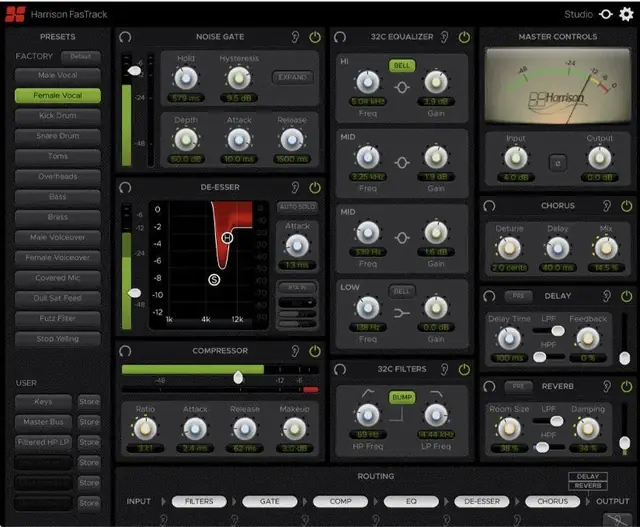
The dynamics section features a noise gate with an optional expander mode, a de-esser for taming sibilance, and a versatile compressor. These tools let you clean up signals and control dynamic range effectively. The EQ is based on Harrison’s legendary 32C channel EQ, with four bands: high, low, and two mid bands.
The high and low bands default to shelf filters but can be switched to bell shapes, and the mid bands are bell filters. A separate filter section includes variable high-pass and low-pass filters, plus a BUMP button that adds a gain boost at the HPF corner frequency. This allows you to cut low rumble while adding a low-end emphasis.
Effects and Routing
FasTrack includes chorus, delay, and reverb effects. The chorus adds width and depth by duplicating the signal with pitch and delay variations, ideal for vocals. Delay and reverb are processed in parallel with the main signal, emulating traditional send/return routing, so their output controls act as return faders for blending wet and dry signals.
The routing module displays the signal chain from left to right. You can click and drag any of the six routable processing elements to reorder them—inserting, swapping, or moving them as needed. Master input and output trims are fixed at the ends, and a VU-style output meter helps monitor levels.
Workflow and Presets
FasTrack’s workflow is designed for on-the-fly adjustments in live settings. The presets module, located on the left side, gives you one-click access to 14 factory presets and 6 user slots, allowing you to recall your own settings instantly without navigating menus. A default button resets the plugin to its factory state.
This makes it easy to adapt to different sources or rooms during a performance or broadcast. The combination of fast preset switching and intuitive controls means you can tweak the sound in real time, whether you’re mixing a show, recording a podcast, or enhancing a karaoke session. The plugin streamlines complex processing into a practical, immediate tool.
Key features
- 14 factory presets and 6 user presets with one-click access
- Noise gate with expander mode, de-esser, and compressor
- Harrison 32C parametric EQ with four bands and proportional Q
- High-pass and low-pass filters with variable corner frequencies and BUMP function
- Chorus, delay, and reverb effects with parallel processing
- Flexible drag-and-drop signal routing
- Master input trim and VU-style output meter
Best for
FasTrack is best for live sound engineers, podcasters, streamers, and broadcasters who need fast, reliable processing for vocals and spoken word. It also excels in karaoke setups and any studio session where you want the immediacy of a live console workflow without sacrificing quality.