ChordAXE is a real-time MIDI controller that turns chord changes, voicings, and rhythms into playable expressions for virtual instruments, built around a visual Mesh of harmonic relationships.
Purpose and Harmonic Navigation
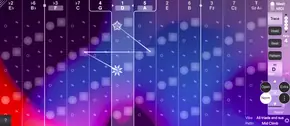
ChordAXE is a real-time controller designed for chords-first songwriting and beatmaking. It lets you play chord changes through virtual instruments without needing to master a fretboard, keyboard, or music theory. Instead, you use a playable Mesh that maps chords and key centers in their natural harmonic order, based on the circle of fifths.
This approach lets you trace paths from chord to chord, exploring tonal palettes and moving through musical vibes by ear. You can browse presets of iconic progressions or trace your own, all while staying oriented in the harmony. The Mesh acts as a visual map that helps you flow from one chord to the next without getting lost in individual notes.
Key Capabilities for Voicing and Expression
ChordAXE provides on-the-fly controls for shaping chord voicings. You can move voicings up or down the instrument’s pitch range, adjust note spacing with spread controls, and flip inversions to create different harmony part lines. Transposing to different keys is instant and doesn’t pitch-shift, so notes stay in the sweet spot of your virtual instrument.
Harmony can be voiced in three, four, or five parts, with an optional sub-octave part. You can stretch voicings beyond the physical limits of a fretboard or keyboard, and execute seamless legato transitions that would be impossible by hand. The controller also lets you carry chord notes and rhythmic patterns across changes, so harmony lines flow musically without stopping.
Workflow and Real-Time Control
In a typical workflow, you drive chord changes from a keyboard, DAW piano roll, or rhythmic pattern presets, and all of these merge in real time. The Mesh view lets you trace chords, while a MIDI view handles expression. You can switch between views to keep creativity flowing during a continuous songwriting or beatmaking session.
The controller also allows you to play outside the movable MIDI control zone, meaning you can mix chord notes with extra notes like melodies, riffs, basslines, passing notes, or pedal tones on the fly. A keyboard display shows both chord and extra notes as they play, giving you visual feedback while you perform.
Practical Applications and Creative Use
ChordAXE is suited for creating song structures, beat foundations, melodies, riffs, and basslines. You can use it to build emotional worlds with your favorite virtual instruments by summoning chord changes, voicings, and rhythmic patterns in a continuous flow. It is especially useful for producers and songwriters who think in terms of chord shapes rather than note-by-note composition.
The controller also serves as a learning tool for harmony. You can explore traced progression presets to decode their harmonic DNA, then apply that knowledge to trace your own changes. By dialing in voicings by ear, you can discover all possible key centers, pitch registers, and inversions, building your harmony chops while exploring endless combinations in real time.
Key features
- Playable Mesh for navigating chords and key centers in circle-of-fifths order
- On-the-fly controls for voicing pitch range, spread, and inversions
- Real-time merging of keyboard, DAW piano roll, and rhythm pattern driving
- Iconic progression presets with reworking in different keys and voicings
- Support for 3, 4, or 5-part harmony plus optional sub-octave part
- Seamless legato chord transitions and carrying notes across changes
- Ability to play extra notes outside the MIDI control zone with visual feedback
Best for
ChordAXE is best for songwriters and beatmakers who want to play chords with fluid voicing and rhythmic expression without music theory, and for producers looking to create well-voiced chord progressions and harmony lines for virtual instruments in real time.