Haaze 2 is a stereo enhancer that makes mono signals feel wider and naturally positioned in a stereo mix, with per-band delay, pan, and width controls.
Purpose
Haaze 2 is a stereo enhancing plugin designed to overcome the limitations of simple left-right panning. Panning a mono sound often fails to place it convincingly in a stereo field, particularly on headphones, where the result can feel flat and artificial. This plugin addresses that by simulating inter-aural time differences, making a sound appear to come from a specific spatial location more naturally.
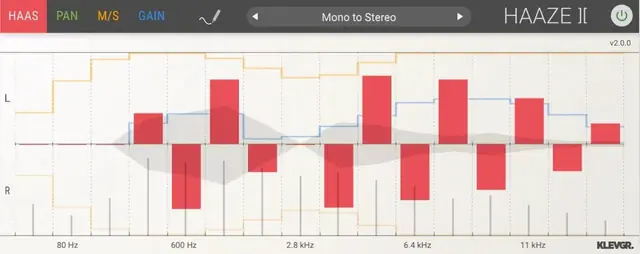
It splits the incoming mono signal into 16 frequency bands. For each band, you can control the delay between the left and right channels, which the Haas effect uses to position the perceived source. You can also pan each band and adjust the stereo width. This allows you to create a wide and immersive soundstage, while keeping low frequencies more centered for stability and mono compatibility.
Key Capabilities
The plugin’s 16 independent frequency bands each offer three controls. The Haas mode lets you set a delay between left and right ears, helping to mimic how sound arrives in real life. The Pan mode (called Pan(ic) button) allows you to pan each band separately, offering more placement flexibility than a single pan knob.
The M/S mode controls the stereo width per band, letting you make high frequencies wider and low frequencies narrower. A gain control on each band compensates for level changes caused by processing. Additionally, a draw mode lets you plot adjustment curves directly, and a dedicated stereo width meter and per-band level meters provide visual feedback.
Workflow
To start, you can load one of the many built-in presets, which provide a variety of starting points for different mixing scenarios. From there, you can use draw mode to sketch your desired panning, width, or delay curve across the frequency range. The interface is designed to make it easy to see and adjust how each band is affected.
After applying changes, use the gain section to compensate for any level differences introduced. The meters help you monitor stereo width and ensure each band is at an appropriate level. This workflow is straightforward enough for quick adjustments but powerful enough for detailed spatial sculpting.
Practical Applications
Haaze 2 is ideal for mixing mono sources such as vocals, guitars, or synth leads, giving them a more immersive presence in a stereo mix. It can be used to place a sound precisely within the soundstage, making it feel anchored and natural. It also helps widen narrow sources, creating a sense of space without sacrificing mono compatibility.
This plugin is suitable for any genre that benefits from a wide stereo image, such as pop, rock, electronic, or film scoring. Whether you are working on a dense mix and need clarity, or an intimate track where spatial cues are important, Haaze 2 provides a flexible way to enhance spatial perception without complex routing.
Key features
- Splits mono signal into 16 frequency bands
- Haas delay control per band
- Pan per band
- M/S width control per band
- Per-band gain compensation
- Draw mode for adjustment curves
- Stereo width and level meters
Best for
Mixing engineers and producers who want to add natural width and convincing spatial placement to mono sources, especially when working with headphones or loudspeakers, and need precise control over the stereo field.