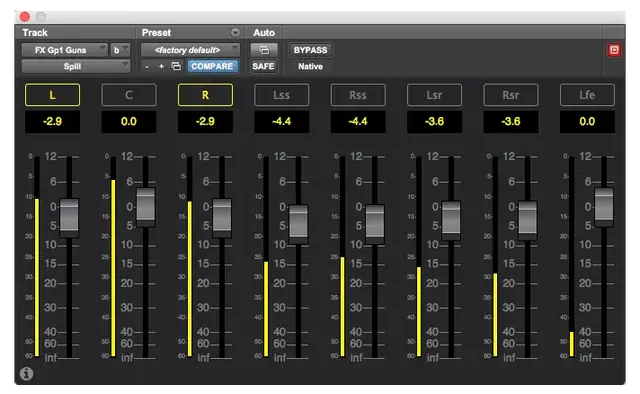
Spill is an AAX Native, DSP, and AudioSuite plug-in for Pro Tools that brings high-end film console spill functionality to multi-channel tracks, offering fast channel-level control for surround mixing.
Purpose
Spill is designed to provide the essential spill feature found on high-end digital film consoles within Pro Tools. It allows engineers to quickly adjust individual channel levels of multi-channel tracks, busses, or masters, from stereo to 7.1, directly from a plug-in interface.
This plug-in addresses a common workflow gap where control surfaces like the Avid S6 cannot spill individual channels of a multi-channel track or bus. Spill fills that void, making it a valuable tool for re-recording mixers, sound supervisors, and editors working in surround formats.
Key Capabilities
Spill can be inserted on any multi-channel Pro Tools track, aux, or master, providing up to eight faders, meters, and gain values for 7.1. Fader levels and bypass can be automated, enabling dynamic adjustments for different mix sections. The plug-in supports all Avid control surfaces, including the S6 and S3.
A key feature is relative grouping of channel faders. Clicking the channel name above a fader adds or removes it from the group, locking relative levels. Moving any fader in the group adjusts all, with Command/Alt held for fine adjustment mode. This is particularly useful for pairing L/R or surround channels.
Workflow
In a mixing context, Spill excels at making quick adjustments during final mixes, pre-dubs, and sound design. For example, in dense effects sequences, you can boost L/R channels to clear space for music or bring up surrounds in a score stem. It also supports global adjustments, like compensating for room changes or creating near-field home video versions.
The AudioSuite version is useful for editorial work, allowing per-clip surround channel adjustments. For larger sessions, the AAX DSP version reduces latency and offers powerful control over groups. Remote control via the V-PlugIn App (part of the V-Control Pro Bundle) provides fast access from iPhones and iPads.
Practical Applications
Spill is mainly geared towards final mixing, as highlighted by re-recording mixer Tom Marks, who notes its value in busy sound effects sequences and stem adjustments. It is also applicable to re-recording and editorial tasks, making it a versatile tool for any surround project.
For control surface users, Spill integrates with the S6’s channelstrip knobs and Expand Mode (up to 8 channelstrips), and the S3 can flip knobs to faders for easier access. The V-PlugIn App displays a list of tracks using Spill, so you can tap a track name to adjust levels without opening the plug-in window.
Key features
- AAX Native, DSP, and AudioSuite formats for Pro Tools
- Insert on multi-channel tracks, auxes, or masters (stereo to 7.1)
- Relative grouping of channel faders for coordinated adjustments
- Bypass and fader level automation
- Compatible with Avid S6 and S3 control surfaces
- First plug-in to support V-PlugIn App for iPhone/iPad control
- Fine fader adjustment mode with Command/Alt
Best for
Best for re-recording mixers, sound supervisors, and editors needing fast, precise control over individual channels in surround tracks, especially in final mixes, pre-dubs, and multi-channel stem adjustments, either from a computer or via control surfaces or mobile apps.