EQuivocate is a linear-phase equalizer with auditory filters modeled on the human ear, featuring match EQ and curve drawing for natural, precise tonal shaping in mixing and mastering.
Purpose and Design
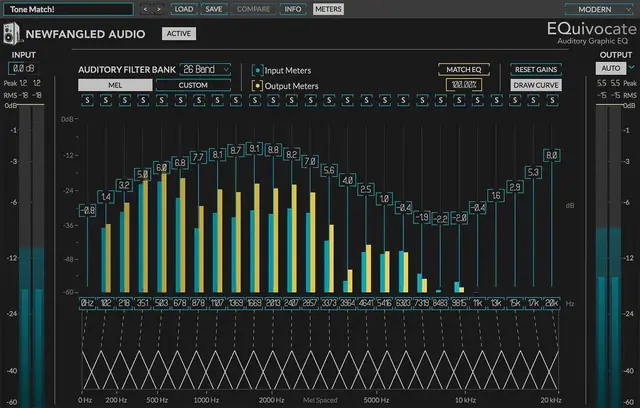
EQuivocate is an equalizer built around the auditory filters of the human ear, using a set of critical bands arranged along the Mel spectrum. This design aims to make any adjustment sound natural, as each band corresponds to how your ear perceives distinct frequency regions. The linear-phase FIR filter shape reduces pre-echo, keeping the sound transparent.
Unlike conventional graphic EQs using IIR filters, EQuivocate’s filter shape remains flat when all bands are neutral, and boosting or cutting one band does not unintentionally affect its neighbors. The triangular filter shape approximates the critical bands in your inner ear, making the EQ behave in a way that feels intuitive and musical rather than technical.
Key Capabilities
The core feature is the Match EQ function, which listens to a sidechain input and matches the tone of your track to that reference signal. This is useful for making a final master sound like a reference song, or for blending two tracks so they feel like they come from the same source. The match is transparent, avoiding over-modeling imperceptible differences.
You can also customize the filters by adding or removing bands, adjusting their frequencies, and drawing an EQ curve directly with the mouse. The draw curve mode lets you sketch a shape, then fine-tune individual bands afterward. An output level auto button compensates for gain changes caused by the EQ, and each band can be soloed to locate problem frequencies.
Workflow and Usability
For mixing, you can use the match EQ to fit a sound into a dense mix by feeding a reference track into the sidechain and letting EQuivocate morph your tone to complement it. The solo function helps you identify and fix resonant or muddy frequencies quickly. The draw curve feature speeds up tonal shaping, letting you sketch a broad curve then refine it.
In mastering, the match EQ is ideal for matching the tone of a final master to a reference track. The linear-phase design minimizes phase artifacts, making it suitable for bus processing. The presets from artists like Richard Devine and Jeremy Lubsey provide starting points, and the compare button lets you toggle between two settings to evaluate changes.
Practical Applications
Use EQuivocate for corrective EQ on individual tracks, like taming harsh frequencies or adding air, with the auditory filters ensuring a natural result. For creative sound design, the draw curve and customizable bands allow for unique tonal shapes. The match EQ is perfect for making a vocal sit in a mix by matching its tone to a reference instrument.
In a mastering chain, place EQuivocate to match the overall tone of a final mix to a reference track, or to gently shape the frequency balance with the linear-phase filters. The presets offer a range of starting points, and the compare button helps you A/B test different settings. The transparent match avoids unnatural artifacts, making it reliable for critical listening.
Key features
- 26 linear-phase auditory filters modeled on human ear critical bands
- Match EQ function for tone matching via sidechain input
- Draw EQ curve with mouse and toggle to fine-tune individual bands
- Automatic output level compensation for EQ-induced gain changes
- Solo individual bands to locate problem frequencies
- Add or remove filters and customize band frequencies
- Artist presets and compare button for quick A/B testing
Best for
EQuivocate is best for mixing and mastering engineers who need a precise, natural-sounding EQ. Its match EQ is ideal for referencing and blending, while the auditory filters suit corrective and creative shaping. It works well on individual tracks, buses, or final masters, especially when transparent linear-phase behavior is desired.