Automated loudness compliance tool for audio post-production, offering faster-than-real-time True Peak correction and integrated limiting for broadcast and streaming standards.
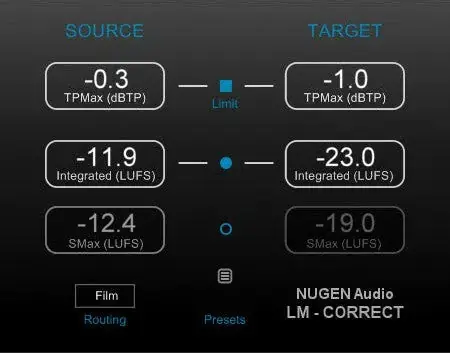
Immediate Loudness Compliance
LM-Correct 2 provides a rapid route to loudness-compliant audio by automatically adjusting files to meet specified standards. It works either within a DAW or NLE as a plug-in or as a standalone application, eliminating manual iterative mixing adjustments. The tool assesses and corrects entire audio files much faster than real time, making it suitable for final checks and quick finishing.
The interface is designed for intuitive operation, with the same conceptual workflow whether using the plug-in or standalone. A single click applies the required loudness correction, targeting integrated loudness and maximum True Peak levels. This automated approach helps prevent costly compliance failures and saves significant time in day-to-day loudness workflows.
Key Capabilities for Broadcast
The included look-ahead True Peak limiter prevents compliance failures due to loudness correction, ensuring output never exceeds specified peaks. It supports mono through 7.1.2 channel configurations and is compatible with current loudness standards including ITU-R BS. 1770, EBU R128, and the CALM Act. Optional dialog-gated measurement is available for specific requirements.
Leq(m) (TASA) measurement is also provided, extending its utility for various broadcast and film specifications. The tool handles short-term and momentary loudness limiting, and an optional DynApt extension enables correction for LRA and dynamics while preserving dialogue intelligibility and respecting intentional dramatic transitions.
Workflow Integration
LM-Correct 2 integrates into existing editing environments through AudioSuite AAX (64-bit and 32-bit) and an Adobe Premiere Pro CEP Panel, allowing in-place normalization without leaving the timeline. It can be used as a final ‘back-stop’ to verify and fix finished files, or as a quick-touch finishing tool during editing.
For file-based processes, the standalone application or plug-in rapidly analyzes and adjusts entire files. This speed supports efficient repurposing of content for different regions or playout specifications, transforming audio from one loudness standard to another with a single click, reducing manual rework in the editor.
Typical Applications
This tool is ideal for post-production and broadcast environments where time is critical. Typical uses include final compliance checks on mixed audio, immediate loudness normalization of mono, stereo, or multichannel content, and fast conforming of files to current standards. It also supports creating multiple delivery versions from a single master.
The optional DynApt extension suits complex specifications requiring dynamic range control, such as dialogue-heavy content or drama where loudness variation must be managed carefully. By automating measurement and correction, LM-Correct 2 reduces the risk of human error and speeds up delivery workflows.
Key features
- Automated loudness compliance to ITU-R BS. 1770, EBU R128, and CALM Act
- Integrated look-ahead True Peak limiter
- Faster-than-real-time file processing
- Mono through 7.1.2 channel support
- Optional dialog-gated measurement and Leq(m) TASA
- AudioSuite AAX, Adobe Premiere Pro CEP, and standalone formats
Best for
Best for audio post-production engineers and broadcasters who need rapid, reliable loudness normalization across multiple deliverables. It suits final quality control, repurposing content for different standards, and ensuring True Peak compliance without manual adjustments. Especially valuable in high-volume workflows where speed and accuracy are essential, such as TV, film, streaming, and advertising.