Spread is an easy-to-use multi-band stereo imaging plugin from Swivel Audio. It widens mono and stereo tracks, with a one-knob interface and tools for balancing and cleaning the stereo field.
Purpose
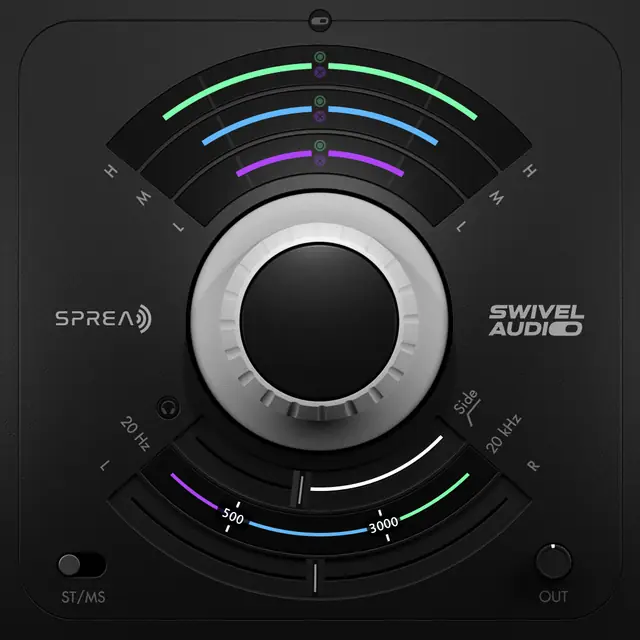
Spread is a stereo imaging plugin that adds width to mono or stereo audio. Its design centers on a single-knob control, making it fast to dial in a broader stereo image. The plugin works across three user-definable frequency bands, allowing you to adjust width independently for lows, mids, and highs.
It also includes a Side Filter that reduces low-end stereo information to clean up muddiness and phase issues. This uses mid-side processing to remove only the side signal from the lows, leaving mono bass intact. An audition function lets you hear exactly what the filter removes.
Key capabilities
Spread offers two different spread algorithms, giving you a choice of character when widening. Each band has offset and mute/solo features, so you can fine-tune how each frequency range is processed. The three-band crossover is adjustable, letting you set the frequency boundaries to match your audio.
The Tilt control adjusts the volume balance between the left and right sides without affecting the overall stereo image. This helps correct asymmetrical mixes. Tilt works independently of the spread function, allowing you to balance your signal while keeping the width you created.
Workflow
You start by adjusting the spread knob to increase width until it sounds right. Then, if needed, you can define the crossover points for the three frequency bands and apply different amounts of spread to each. This allows you to keep the low end tight while making the upper frequencies wider.
Use the Side Filter to remove low-end side information if you notice muddiness or phase weirdness. The audition button helps you confirm the filtered content. The mute/solo per band is useful for isolating a frequency range to hear the effect of spread on just that area, making the workflow very intuitive.
Practical applications
Spread is useful for making mono sources, such as vocals or guitar takes, feel wider in a mix. It can also enhance stereo tracks that sound narrow. The multi-band spreading is particularly handy for adding width to high frequencies while keeping the low end mono and tight.
The Side Filter is valuable for cleaning up low-end stereo information from room mics or synth pads. Tilt helps fix mixes where the left or right side is louder. These features make Spread suitable for mixing, mastering, and sound design when you need to shape the stereo field.
Key features
- One knob to control spread intensity
- Two spread algorithms
- Three user-definable frequency bands
- Band offset control
- Band mute and solo
- Side filter with audition
- Stereo balancing via tilt
Best for
Producers and engineers who want to quickly add width to mono or stereo tracks, especially when they need multi-band control and a simple interface. It is ideal for making vocals, synths, or full mixes sound wider while cleaning up low-end stereo mud.