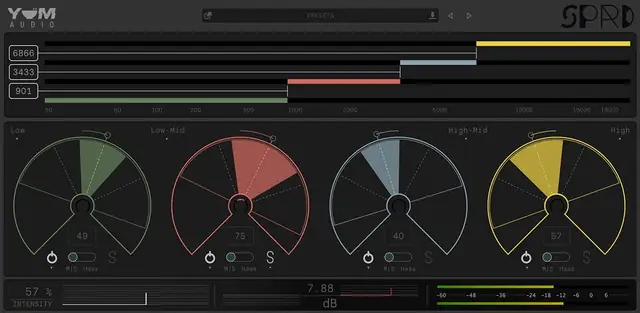
Spread is a multiband stereo shaper that lets you adjust width and panning across four frequency bands, with M/S and Haas modes for detailed stereo field control.
Purpose and Core Concept
Spread is a stereo processing tool designed to give you precise control over the stereo field across the entire frequency spectrum. It splits the audio into four distinct frequency bands, allowing you to independently adjust the width and panning of each band. This enables you to center the bass, widen the highs, or position any element exactly where you want it within the stereo image.
The plugin is built around four bands and four primary controls, ensuring maximum flexibility without overwhelming complexity. Each band can be soloed or bypassed, so you can focus on specific frequency areas with confidence. An overall intensity slider lets you dial in the global amount of processing, making it easy to apply subtle widening or dramatic stereo effects.
Key Capabilities and Modes
Spread offers two distinct stereo processing modes for each frequency band: Mid/Side and Haas. In Mid/Side mode, you can adjust the level of the mid and side components independently, giving you a classic, transparent method for widening or narrowing the stereo image. Haas mode uses a short delay between the left and right channels, providing a creative alternative to traditional panning that can make sounds appear wider or shift their position in an interesting way.
Each mode offers unique panning and widening behavior, so you can choose the approach that best suits the material. The adjustable crossovers between the four bands are designed to be super smooth, ensuring that frequency separation feels natural and does not introduce artifacts. The interaction between band width and panning is intentionally musical, allowing for organic adjustments that sit well in a mix.
Workflow and Control
The workflow in Spread is designed to be intuitive and efficient. You start by setting the crossover frequencies to define the four bands, then adjust the width and pan for each band as needed. The ability to solo or bypass individual bands makes it easy to compare different settings and make precise adjustments without affecting the overall sound.
The intensity slider controls the overall processing amount, allowing you to blend the processed signal with the original if desired. This is particularly useful for creating parallel processing effects or simply ensuring that the widening effect remains subtle and mix-ready. The controls are laid out clearly, with each band’s parameters easily accessible, so you can quickly shape the stereo field without getting bogged down in complex menus.
Practical Applications
Spread is adaptable to a variety of sources, including synth tracks, guitars, strings, drums, and vocals. For example, you can center the low-frequency band to keep bass and kick drums tight and focused, while widening the high-frequency band to add air and space to cymbals or vocals. On a synth pad, you might use Haas mode on the midrange to create a lush, spacious effect.
In a mix context, you can use Spread to quickly reposition elements within the stereo field. If a guitar part is competing with a vocal, you can narrow the guitar’s width in the vocal frequency range or pan it slightly off-center. For drums, you can widen the overheads or room mics while keeping the kick and snare centered, creating a sense of depth and width without compromising punch.
Key features
- Four-band multiband stereo shaping
- Independent width and panning per band
- Mid/Side and Haas processing modes
- Adjustable crossovers for frequency separation
- Intensity slider for overall processing amount
- Solo and bypass per band for precise control
Best for
Spread excels at mixing tasks that require detailed stereo field control, such as tightening low end, widening high-frequency elements, or creatively repositioning instruments within a mix. Its dual-mode design makes it suitable for both transparent corrections and experimental widening, fitting well in music production, mixing, and sound design contexts.