Apollo Monitor Correction Add-on by Sonarworks brings realtime SoundID Reference calibration directly into Apollo X interfaces, applying speaker and headphone correction profiles via UA DSP for low-latency, set-and-forget monitoring.
Purpose and Integration
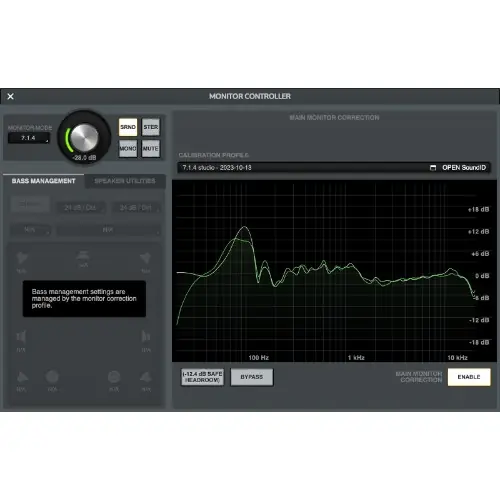
Apollo Monitor Correction Add-on is a Sonarworks solution that integrates SoundID Reference correction profiles directly into Apollo X audio interfaces. It requires a valid SoundID Reference product license and a compatible Apollo X device, covering both Gen 1 and Gen 2 models. The add-on functions as an API solution, enabling seamless communication between SoundID Reference software and Apollo X hardware.
This integration allows you to apply calibration profiles in realtime using UA studio-grade precision filters and alignment delays. It supports correction for stereo, multi-channel speaker arrays, and simultaneous headphone correction, depending on the interface model. The goal is to create a reliable reference listening environment within your existing hardware.
Key Capabilities
Apollo X desktop interfaces offer DSP-based correction for stereo speakers and one headphone output. Rackmount interfaces extend this to support stereo, surround, and immersive speaker modes, along with simultaneous correction for two headphone outputs. This flexibility accommodates various studio setups, from simple stereo to complex multichannel configurations.
The correction profiles run directly on the Apollo X hardware, ensuring high performance and low latency. You can apply speaker profiles and headphone profiles from over 500 supported models. The add-on is designed as a ‘set-and-forget’ solution, allowing you to focus on mixing without constantly adjusting monitoring settings.
Workflow and Setup
The workflow begins with creating a speaker profile using SoundID Reference. This measurement process takes at least 20 minutes, during which the software assesses your room’s acoustic properties, speaker characteristics, and their relative positions around the listening spot. This step is essential for accurate calibration.
Next, you select a target profile, such as Flat, Dolby, a custom profile, or one that simulates other devices. After that, you send the calibration profile to the Apollo X, where it runs directly in the hardware. For headphones, you can set up and export profiles from the extensive library, and these also run within the Apollo X.
Practical Applications
This add-on is ideal for mixing and mastering engineers who need accurate translation across different playback systems. By applying correction directly in the hardware, you can avoid additional software latency, making it suitable for tracking sessions where realtime monitoring is crucial. It also benefits collaboration, as artists can hear the same calibrated sound.
For multichannel setups, rackmount Apollo X users can apply correction to surround and immersive formats, which is useful for post-production and film mixing. The simultaneous headphone correction allows for consistent monitoring across multiple engineers or talent. The low-latency, hardware-based processing ensures a seamless experience in professional environments.
Key features
- Realtime SoundID Reference integration with Apollo X DSP
- UA studio-grade precision filters and alignment delays
- Stereo, multichannel, and headphone correction support
- Compatible with Apollo X Gen 1 and Gen 2 interfaces
- Over 500 supported headphone profiles
- High performance with low latency processing
- Set-and-forget reference listening environment
Best for
Engineers and producers using Apollo X interfaces who own SoundID Reference and need low-latency, hardware-based monitor correction for stereo, surround, or headphone setups, ensuring accurate mix translation across various listening scenarios.