VoiceAssist Basic is an offline vocal leveling plugin that creates editable volume automation for smooth, transparent results, replacing manual clip-gain editing and real-time gain riders.
Purpose
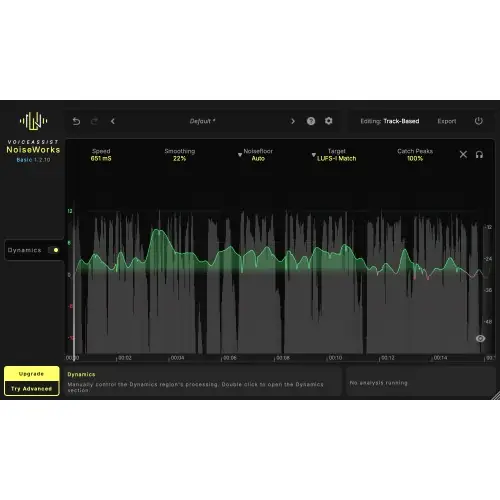
VoiceAssist Basic from NoiseWorks is designed to automate vocal leveling by analyzing an entire recording before making any adjustments. Unlike real-time gain riders that react on the fly, this plugin processes audio offline, giving it a complete view of the performance to produce smoother and more consistent volume changes.
The core function is to turn vocal dynamics into a visible automation curve that you can edit. This replaces the tedious process of manual clip-gain editing and offers a transparent alternative to real-time processing, making it useful for engineers who want precise control without artifacts.
Key Capabilities
The Dynamics section analyzes every word and syllable, then writes custom volume automation based on your settings. Choose High Speed for a subtle volume ride that is barely noticeable, or Fast Speed for aggressive leveling that suits modern vocals or rap, ensuring a clear, consistent presence.
VoiceAssist Basic offers editable automation, so you can fine-tune every adjustment after analysis. It includes a speed and smoothing control for adjusting response time and transition smoothness. Intelligent noise floor detection automatically avoids boosting background noise. Target modes for LUFS-I and LUFS-S let you match loudness automatically or use a custom target, with integrated peak control to trigger compression only when needed.
Workflow
The plugin operates offline, meaning you first run an analysis of the audio. You can use ARA or Transfer Mode to get the recording into the plugin. Once analyzed, the plugin generates volume automation that appears in your DAW, ready for review and manual adjustments.
Before applying results, you set your desired speed and smoothing parameters. The plugin’s intelligent noise floor processing helps ensure quiet sections are not boosted. You can also configure target loudness settings and peak control, then commit the automation to the track, which can be further edited just like any automation lane.
Practical Applications
VoiceAssist Basic is ideal for smoothing out dialogue levels in video post-production, where consistent volume is important for intelligibility. It also works well for lead vocals in music, especially for genres requiring uniform loudness like pop or rap.
Use High Speed mode for transparent leveling on dialogue tracks, and Fast Speed for a more present sound on vocals. The plugin’s editable automation makes it suitable for detailed mix adjustments. You can also apply it to background vocals to keep them even without over-processing.
Key features
- Offline Analysis – examines entire recording before processing
- Editable Automation – every adjustment is visible and manually editable
- Speed & Smoothing – controls for response time and transition smoothness
- Intelligent Noise Floor – auto-detects and avoids boosting background noise
- Target Modes – LUFS-I and LUFS-S matching with automatic or custom target
- Catch Peaks – dedicated peak/transient management without affecting leveling
- ARA & Transfer Mode – works in all major DAWs
Best for
VoiceAssist Basic is best for engineers and producers working on vocals or dialogue who need transparent, offline leveling with full manual control. It is especially useful in post-production for dialogue and in music for modern genres requiring aggressive vocal consistency, like rap.