Dynamic Grading 2.0 is a three-band dynamics processor that uses a histogram interface to control punch, body, and floor independently, replacing traditional threshold and ratio controls with graphical markers.
Purpose and Core Concept
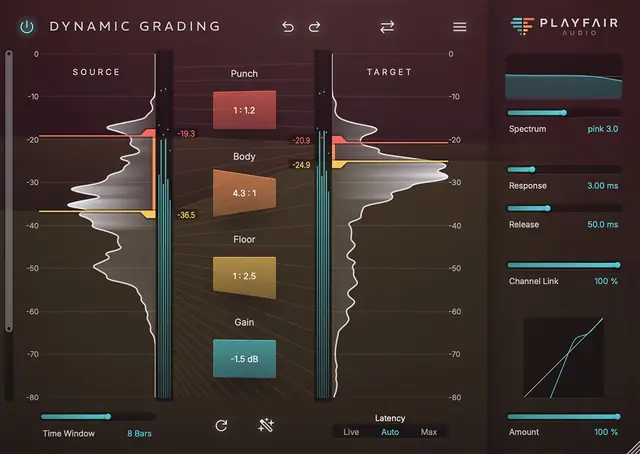
Dynamic Grading 2.0 is a dynamics processor designed to replace guesswork in mixing. It focuses on three distinct dynamic regions—punch, body, and floor—allowing independent compression or expansion ratios for each. The interface is built around a dynamic histogram, which displays the statistical distribution of signal levels over time.
This histogram reveals the dynamic range and which loudness regions are most prominent, helping users identify static or dynamic audio. Traditional threshold and ratio knobs are replaced by graphical markers: left markers define the source range, and right markers define the desired target range. Narrowing the target compresses, while widening it expands.
Key Capabilities
The punch region handles transients, consonants, and note onsets. Users can compress to smooth onsets and create distance, or expand to increase impact and bring a track forward. The body region covers sustained tones and timbre; compressing it makes tracks sit firmly in the mix, while expanding creates space when a track overloads the bus.
The floor region includes reverb tails, background noise, and note decay. Expanding gently reduces reverb or noise for cleaning, while compressing can produce artistic effects. Each region can be adjusted independently, giving nuanced control over the entire dynamic spectrum without overwhelming the user with parameters.
Workflow and Interface
The workflow is centered on visual guidance from the histogram. Users specify where the relevant dynamic ranges exist in the source audio and where they should appear in the result, with markers that simplify the adjustment process. This approach avoids the need to tweak abstract knobs, letting users make decisions based on what they see.
A suggested workflow is to place Dynamic Grading on every track and leave all faders at 0 dB, effectively painting the mix by positioning each track within the dynamic range. The interface is designed to minimize distractions, allowing users to focus on creative choices rather than technical problem-solving.
Practical Applications
For vocals, the tool can refine dynamic range by shaping punch for consonants and body for timbre, while floor adjustments clean up reverb or noise. On individual instruments, it can make elements more present or push them back for depth. On a full mix, it helps sculpt the overall dynamic balance, clearing out muddiness or adding groove.
The floor region is particularly useful for cleaning up recordings by gently reducing unwanted reverb or background noise. For creative effects, compressing the floor can yield unusual results. The tool is designed for both track-level and mix-bus applications, offering flexibility in various mixing scenarios.
Key features
- Independent control over punch, body, and floor dynamic regions
- Dynamic histogram visualization for level distribution
- Graphical markers replace traditional threshold and ratio controls
- Compression or expansion per region with adjustable ratios
- Suitable for individual tracks and full mix processing
Best for
Best for mixing engineers seeking a visual, intuitive alternative to traditional compressors, especially for sculpting transients, taming reverb tails, or balancing dynamic range on vocals, instruments, or full mixes without diving into complex parameter sets.