Armada by Fiedler Audio enables any VST3 effect to process entire immersive mixes, including Dolby Atmos, HOA, and custom channel layouts, directly within your DAW or the Dolby Atmos Composer.
Purpose and Key Capabilities
Armada is a host plug-in that bridges your existing VST3 effects and immersive audio formats. It accepts nearly any VST3 plug-in on its insert and routes signals across channel layouts spanning mono to 128 channels, including Higher Order Ambisonics, Dolby Atmos, Auro 3D, Eclipsa, and NHK 22.2. This allows you to apply familiar processing to entire mixes without format-specific limitations.
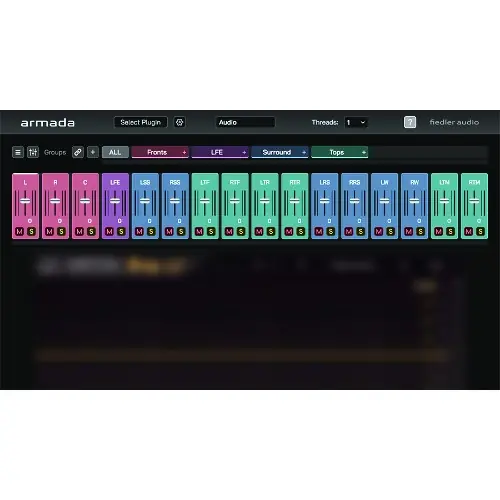
The plug-in loads as VST3, AU, AAX, or OBAM. As an OBAM plug-in, it fits directly into the Master Channel of Fiedler Audio’s Dolby Atmos Composer, enabling full-mix processing with a single instance. Its internal channel mixer lets you control the output signal precisely, while a multithreaded engine distributes processing load across CPU cores.
Workflow and Grouping
Armada organizes channels into groups, which you define based on your session’s needs. Each group can host its own VST3 effects with individual settings, letting you apply different treatments to different parts of the mix, such as drums or rears. This grouped approach keeps complex sessions manageable and visual clutter low.
A built-in preset system saves your channel-grouping arrangements, so you can quickly recall them for new sessions or different projects. Global groups extend this concept across multiple Armada instances, allowing linked processing and sidechain routing throughout a session. This is especially useful for consistent bus-style processing across an entire mix.
Sidechain and Routing
Armada’s sidechain functionality is built around global groups, so you can route sidechain signals between any instances in your project. A dedicated sidechain mixer lets you customize exactly what feeds the sidechain input of the loaded VST3 plug-in, giving you precise control over dynamics and keyed effects.
External sidechain input supports up to 64 channels, depending on your DAW’s capabilities, which is ample for feeding complex scenes or reference signals. This feature integrates smoothly into existing mixing workflows, allowing you to use armada without restructuring your routing. The sidechain mixer’s flexibility means you can blend multiple sources before they reach the effect.
Practical Applications
Armada is ideal for immersive mixing and mastering workflows where you need to apply standard VST3 effects to full formats. For example, you could put a compressor or EQ across an entire Dolby Atmos mix in the Dolby Atmos Composer’s Master Channel, using the sidechain to trigger from a specific element.
It also suits post-production houses working with Auro 3D or HOA, as it removes the need for format-specific effects. The grouping and preset system speeds up session setup, and global groups allow linked dynamics processing across multiple instances. Multi-threading ensures that even demanding plug-ins remain viable on large channel counts.
Key features
- Load any VST3 effect on layouts from mono to 128 channels, including HOA, Auro, Eclipsa, and Dolby Atmos
- Works as OBAM plug-in in the Master Channel of Dolby Atmos Composer and Mastering Console
- Global groups link multiple instances for sidechain and linked processing
- Sidechain mixer customizes the input to the loaded VST3 plug-in
- Built-in preset system for rapid channel grouping and session setup
- Multithreaded audio processing engine for demanding loads
- Channel mixer for fine-tuning the output signal
Best for
Armada best suits mixers and mastering engineers working in immersive formats, especially those using Dolby Atmos Composer. It lets them apply their preferred VST3 effects to entire complex mixes with ease, preserving their existing plug-in arsenal while extending its reach to any channel layout or bed.