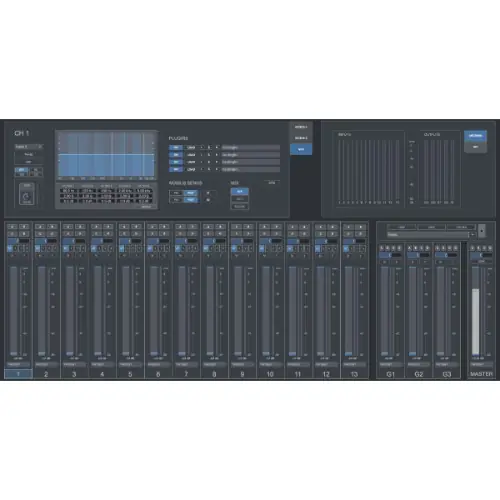
CMixer is a standalone software mixer for live broadcasting and small events, offering 13 channels, automix, follow, and gate modes, plus plugin support, to replace hardware mixers using a computer and audio interface.
Purpose
CMixer from Digital Brain Instruments is a standalone mixing application designed for event broadcasting scenarios such as online radio, talk shows, dialogue recording, speeches, conferences, meetings, podcasting, and small live concerts. It lets you route outboard gear—like modulars, drum machines, and synthesizers—through an audio interface and mix entirely inside the box, avoiding the distractions of a full DAW environment.
Instead of a hardware mixer, you can use a computer and any compatible audio interface to manage your audio broadcasting events. The software provides a dedicated mixing surface with essential controls, allowing you to set levels, apply processing, and focus on your outboard equipment without needing to navigate a complex DAW timeline or session structure.
Key Capabilities
The mixer includes 13 channels: up to 10 mono inputs and 3 stereo inputs, which can also be used in mono. Each channel offers a phase invert switch, a -20 dB pad, a high-pass filter, input gain with ±15 dB range, a 5-band parametric EQ, and up to 4 AU or VST plugins. Additional controls include pan, mute, and solo per channel.
Three channel groups and two stereo mix bus sends provide flexible routing, while two stereo outputs and an external recording output handle main and auxiliary feeds. A side-chain gain control is available for stereo channels, and a built-in pink noise generator aids in level setting. The mixer supports saving and recalling presets for different setups.
Workflow
For multi-microphone sessions, the Automix engine automatically controls output gains, reducing feedback from nearby mics and background noise. Follow mode tracks the active speaker, muting all other channels to keep only the main speaker’s output audible. Gate mode activates or deactivates channels based on output level, clearing unwanted noise from other audio channels.
Recording is available in stereo, mono, or multi-track modes, where you can record only selected input channels. A MIDI matrix lets you control CMixer via an external MIDI device, enhancing hands-on operation. The mixer operates at sample rates up to 192 kHz and 32-bit, depending on your soundcard’s capabilities, ensuring high-resolution audio for professional broadcasts.
Practical Applications
CMixer suits live radio shows, podcast recordings, talk shows, and conference sessions where multiple microphones are in use. The automix and gate modes streamline multi-mic management, reducing manual fader adjustments and minimizing audio bleed. For small live concerts, you can mix synthesizers, drum machines, and other outboard gear with your favorite plugins in real time.
The standalone nature allows you to focus on performance or discussion without DAW overhead. Using an audio interface instead of a hardware mixer cuts setup complexity and cost. The external recording output enables capturing a clean feed for broadcasting or archival, while preset recall speeds up changeovers between different event configurations.
Key features
- 13-channel mixer: 10 mono + 3 stereo inputs
- 5-band parametric EQ and up to 4 AU/VST plugins per channel
- Automix, Follow, and Gate modes for multi-mic sessions
- 3 channel groups, 2 stereo mix bus sends, 2 stereo outputs
- External recording output and side-chain gain control
- Pink noise generator and MIDI matrix control
- Save and recall presets
Best for
CMixer is best for broadcasters, podcasters, and live performers who need a dedicated mixing surface without DAW distractions. It excels in multi-microphone settings like talk shows or conferences, where automix and gate modes simplify gain management. It also suits small concerts using outboard gear, replacing a hardware mixer with a computer and audio interface.