Front DAW by United Plugins is a channel input plugin that adds analog-style gain and subtle saturation to every track, turning a DAW mixer into a virtual analog console with three circuit types and random per-instance modeling.
Purpose and Concept
Front DAW is designed as the first insert on each track in your DAW, acting as a virtual analog input stage. It adds controllable gain and gentle saturation to individual channels, emulating the character of real console inputs. The plugin addresses the often-sterile clarity of digital recordings by introducing subtle coloration and a sense of analog depth.
Its primary goal is to let every track pass through a modeled analog front end, similar to plugging into a hardware console channel. This works across an entire mix, providing cohesive tonality and a unified analog feel. The effect is intentionally subtle, suitable for use on many tracks simultaneously without making the mix sound dirty or overloaded.
Key Capabilities
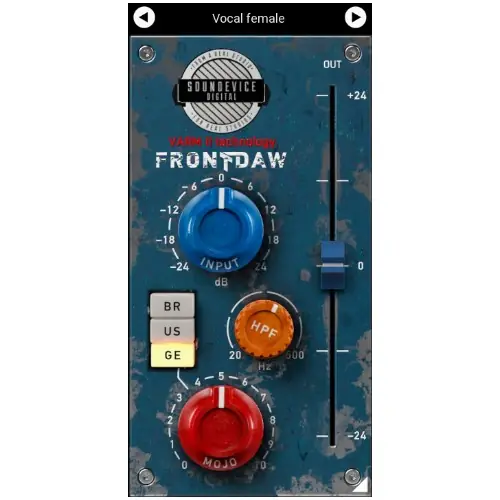
Front DAW includes three saturation circuit types: BR for classic British consoles, US for American-style input, and GE for a vintage German tube console. Each offers a distinct tonal flavor. The Mojo knob controls the amount of saturation applied, allowing fine-tuning from barely there to more noticeable coloration.
The plugin’s VARM (Variable Analogue Random Modeling) technology is a standout capability. It simulates the natural component tolerances and randomness of real analog gear. As a result, every plugin instance behaves slightly differently, even with identical settings. This mimics the subtle variations found in physical console channels, adding realistic randomness to your mix.
Workflow and Use
In a typical workflow, you insert Front DAW as the first plugin on each track of your project. You set the input gain to an appropriate level and choose your preferred saturation circuit. Then adjust the Mojo knob to dial in the desired amount of drive. The process is straightforward, allowing quick setup across many channels.
The plugin is said to be CPU-friendly, so running many instances is feasible. Each instance’s VARM randomness ensures that even with uniform settings, every track has its own subtle character. This helps build a mix that feels cohesive yet organic, avoiding the sterile uniformity of digital processing. It is ideal for producers seeking analog warmth without a complex setup.
Practical Applications
Front DAW shines in mixing scenarios where you want to emulate a full analog console path. Use it on individual tracks—drums, vocals, guitars—to add consistent analog-style gain staging and saturation. It can also be applied to buses or the master, though the intended use is per-track to create the ‘front door’ effect.
This plugin suits genres that benefit from warm, analog character, such as rock, jazz, hip-hop, or electronic music with vintage influences. It also works well for producers who use ITB (in-the-box) setups and miss the randomness and coloration of hardware. The subtle effect makes it useful for adding cohesiveness across an entire session without drastic changes.
Key features
- Three saturation circuits: BR, US, and GE
- VARM technology makes each instance perform slightly differently
- Mojo knob controls the amount of saturation
- CPU-friendly design for use on every track
- Output fader added in version 1.6
- Resizable photorealistic GUI
- 64-bit audio processing at any sampling rate
Best for
Adding analog-style input saturation and gain to every track in a mix, especially for producers seeking subtle, CPU-friendly console character. It works well for many genres and helps create a cohesive analog feel in digital productions.