ReStem 2 Pro is a drum-specific stem separator that splits a mixed drum track into seven individual stems—kick, snare, hi-hat, toms, ride, crash, and other—directly in your DAW or as a standalone app.
Purpose and Core Separation
ReStem 2 Pro is designed exclusively for drums, turning a single stereo drum recording into separate tracks for the kick, snare, hi-hat, toms, ride, and crash, plus an ‘other’ stem for non-drum content. It works live while the track plays in your DAW, or renders offline for higher quality.
The separation engine focuses only on drums, which allows it to handle messy recordings with bleed from other instruments better than general-purpose separators. The standalone app is included for use without a DAW, and the engine runs locally with no cloud uploads.
Key Capabilities
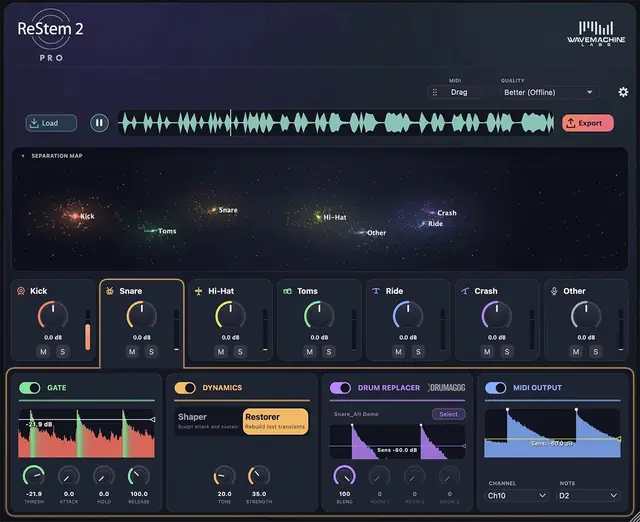
Each separated stem gets its own channel strip with a gate to reduce bleed between hits, a transient shaper to adjust dynamics, and a restorer to rebuild transients on kick and snare. The Drumagog engine is integrated for drum replacement on these two tracks, and every stem can output MIDI via the TrigNet trigger engine.
The Separation Map visualizes each drum as a cluster of stars in real time, with position and height indicating pitch and velocity. This helps you understand what the separator is isolating while you listen.
Workflow and Integration
In DAWs that support ARA2, ReStem 2 Pro reads the track immediately upon insertion. You click Process and the stems appear without bouncing or additional recording passes. In other DAWs, it operates as a normal insert effect.
Three quality modes are available: a realtime ‘Good’ mode for immediate playback, and two offline render modes—’Better’ and ‘Best’—that offer progressively cleaner separation, with the ‘Best’ mode tuned for messy recordings. The engine is repeatable, so the same input always produces identical stems.
Practical Applications
ReStem is ideal for remixing or rebalancing drum mixes when you only have a stereo file, such as a room mic recording, rehearsal take, or an old bounced session. You can adjust each drum’s level, mute or solo it, or move it to its own track for further processing.
It also excels at cleaning up existing drum tracks by removing bleed, like hi-hat leakage on a snare track or bass guitar on drum mics. The MIDI output allows the original performance to trigger any virtual drum instrument, while the drum replacer can swap in samples from your library.
Key features
- Separates stereo drum tracks into seven stems: kick, snare, hi-hat, toms, ride, crash, and other
- Three quality modes: realtime (Good) and two offline renders (Better, Best)
- Per-stem channel strip with gate, transient shaper, and transient restorer
- Integrated Drumagog engine for drum replacement on kick and snare
- MIDI output on every stem via TrigNet trigger engine
- Real-time Separation Map visualization
- Works as an ARA2-enabled plugin, standard insert, or standalone app
Best for
Best for producers and engineers who need to isolate or remix drums from a single stereo recording, clean up bleed in existing drum tracks, or trigger sampled drums from live performances—all within a drum-focused, local processing tool.