MDrumReplacer by MeldaProduction replaces weak or poorly recorded drums with high-end samples while preserving the original live feel and dynamics.
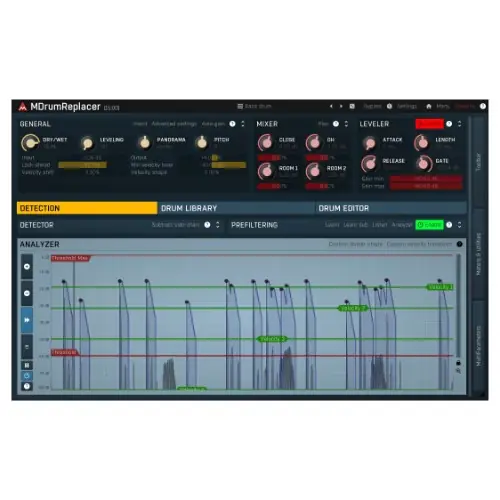
Purpose and Core Benefit
MDrumReplacer addresses a common studio frustration: drum tracks that fail to deliver due to poor mic placement, an uninspiring kit, or uneven performance. Instead of accepting a lackluster take, this tool swaps the original drum sounds with premium samples in seconds. It is designed to rescue recordings that would otherwise require re-tracking or heavy manual editing.
The key benefit is the preservation of the original performance’s natural dynamics and nuances. While many drum replacement tools produce an artificial, stiff result, MDrumReplacer aims to maintain the live feel, making the upgraded track sound polished yet authentic. This makes it suitable for both studio projects and live recordings where the energy of the performance is crucial.
Key Capabilities
The tool provides access to a wide range of professional-grade drum kits, ensuring that the replacement sounds match the genre and style of the music. It integrates these samples seamlessly into the original track, so the transition is smooth and the final result sounds cohesive. The processing is fast, allowing for quick iteration during mixing or post-production.
Advanced correction features address common recording issues like inconsistent hits or resonant frequencies from the room, effectively cleaning up the drum sound without requiring manual sample-by-sample editing. The user interface is designed to be intuitive, making the replacement process straightforward for both experienced engineers and those new to drum replacement.
Workflow and Integration
In a typical workflow, a user loads MDrumReplacer onto a drum track that needs improvement. The plugin analyzes the incoming audio, detects the drum hits, and then triggers the chosen high-end samples in real time. This allows the engineer to audition different kits and settings without leaving the mixing session.
For live recordings, the tool can clean up bleed from other drums or cymbals while reinforcing the main hit, resulting in a tighter, more defined rhythm section. In the studio, it is valuable for replacing a weak kick or snare while keeping the original performance timing and feel. The output can be blended with the original signal to avoid an overly robotic character.
Practical Applications
MDrumReplacer is useful in several scenarios: salvaging a demo recording where the drums were tracked quickly with limited mics, fixing a live performance where the drum sound was compromised by the venue acoustics, or simply upgrading a stock kit to a more polished sound. It is suited for genres ranging from rock and pop to metal and electronic music.
Because the tool maintains the live feel, it is particularly effective for bands that want to keep the organic energy of a performance but need the sonic quality to match a professional release. It also speeds up the post-production process by eliminating the need to manually align samples or redrum an entire track, allowing the engineer to focus on other elements of the mix.
Key features
- High-end drum kits with a wide range of sounds
- Seamless replacement of substandard drum audio
- Preserves natural dynamics and live feel
- Corrects issues from poor mic placement or bad kit
- Intuitive interface for quick setup and audition
- Fast processing for efficient workflows
- Suitable for studio and live recordings
Best for
MDrumReplacer is best for producers and engineers who need to quickly upgrade drum recordings with premium samples while keeping the original performance’s energy. It excels in fixing problematic tracks from live shows or poorly set-up studios, delivering a polished, professional sound in seconds.