MTurboComp is a versatile dynamics processor that emulates classic vintage compressors using machine learning, offers deep customization, and includes a multiband version for creative routing.
Purpose and Core Emulations
MTurboComp is designed to recreate the sound of classic vintage analog compressors, but it goes beyond simple emulation. The developer used machine learning to model a wide range of iconic units, ensuring a realistic response without manual circuit analysis. This approach yields a collection of compressors that are accessible in one tool.
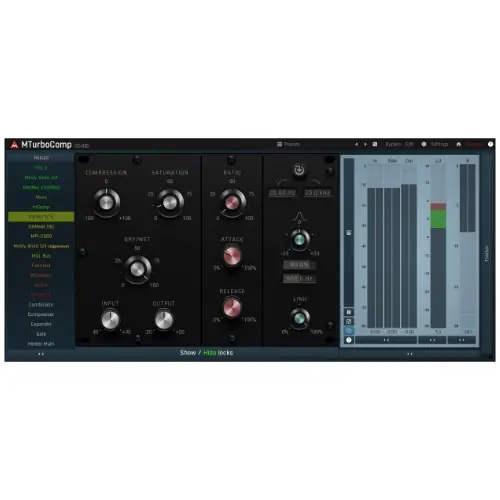
Each emulation features a consistent interface, so you always know where the key controls are. You get the original parameters plus modern additions like a compression knob for fine-tuning the amount of effect, a saturation control for extra character, and a dry/wet mix for parallel processing. This makes it easier to compare different compressors and dial in the desired sound quickly.
Key Capabilities and Workflow
The workflow is built around speed and flexibility. You can switch between different vintage compressor models with a single click, which dramatically speeds up A/B testing and creative exploration. The consistent GUI means you don’t have to relearn controls for each model, reducing friction in your mixing or mastering sessions.
Additional features include a side-chain input with detector filters, including high-pass, low-pass, and peak filters, allowing you to shape which parts of the signal trigger compression. Automatic gain compensation helps maintain consistent output levels, while a safety limiter prevents clipping. Mid/side processing and A-H snapshots are also included, giving you powerful tools for stereo control and quick recall of settings.
Designing Custom Compressors
MTurboComp is not just about emulating existing hardware; it also lets you design your own dynamics processors. You can use four level detectors in parallel, each following the input or side-chain, with adjustable settings and transformation curves. This allows for complex, custom compression behaviors that go beyond traditional designs.
You can also incorporate a fully-featured dynamic equalizer and two saturators into your signal chain, enabling you to shape the frequency response and harmonic content dynamically. With modulators, you can create even more intricate effects, such as listening to both the input and side-chain simultaneously or following different parts of the spectrum with different settings. This makes it a powerful tool for sound designers and advanced users.
Multiband and Practical Applications
A multiband version, MTurboCompMB, is included with MTurboComp. This allows you to create a multiband setup where each frequency band can be processed with a different vintage compressor emulation. You could, for example, use a fast optical compressor on the high frequencies and a slower tube compressor on the low end, all within a single plugin.
You can also process transients with one compressor and the sustained part of the signal with another, thanks to the flexible routing options. This is ideal for parallel compression setups, where you want to blend compressed and uncompressed signals for greater control. In practice, MTurboComp is suitable for mixing, mastering, and sound design, especially when you need to emulate classic hardware or create novel dynamics effects.
Key features
- Emulates multiple classic vintage compressors via machine learning
- Consistent GUI across all emulations for fast workflow
- Includes multiband version for per-band processing
- Four parallel level detectors for custom designs
- Built-in dynamic equalizer and two saturators
- Side-chain input with high-pass, low-pass, and peak filters
- Automatic gain compensation, safety limiter, and mid/side processing
Best for
MTurboComp is best for mixing and mastering engineers who want a wide palette of classic compressor sounds in one plugin, as well as sound designers seeking to create custom dynamics processors. It also suits producers who need quick A/B comparisons of different compression styles without switching between multiple plugins.