Softube Tape is an analog tape emulation plug-in with three modeled tape machines, offering vintage warmth, cohesion, and saturation with presets from Grammy-winning engineers.
Purpose
Softube Tape brings the classic warmth and cohesion of analog tape to digital mixes. It uses component-level and physical modeling to replicate three distinct tape machines, adding a smoothing effect that glues individual tracks together, creating a unified, song-like sound. It is designed to turn a collection of tracks into a cohesive piece with weight and warmth.
The plug-in provides an easy way to add vintage character, whether on a master bus or individual tracks, and includes presets from Grammy-winning engineers to help users achieve professional results quickly. Its modeling captures both the desirable tonal qualities and the subtle imperfections of tape.
Key Capabilities
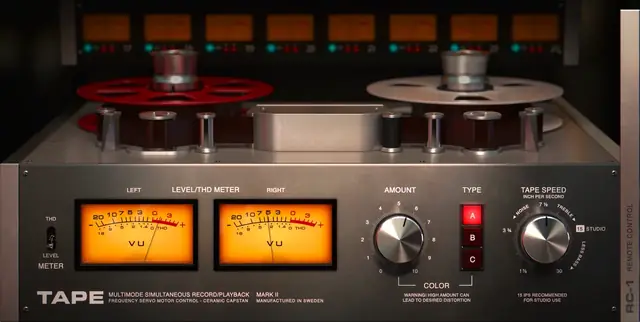
The plug-in includes three tape machine types: Type A, based on a Swiss reel-to-reel for precision and linearity; Type B, a transformer-based machine that adds weight and cream to the low end; and Type C, a British machine with a vintage vibe. Each offers a different tonal character, from clean and precise to colorful and warm.
An Amount knob controls saturation, while five tape speed settings (1 7/8, 3 3/4, 7 1/2, 15, 30 ips) allow adjustment of fidelity. Additional controls include a dry/wet mix, stability for wow and flutter, a mastering-grade high-frequency shelf, crosstalk emulation, and optional tape noise. Run and Stop buttons simulate machine start/stop effects.
Workflow
Using Tape is straightforward: select a tape machine type, adjust the Amount knob for saturation, and optionally tweak tape speed or open the Remote Control panel for deeper settings like stability and crosstalk. Users can also load presets for quick results. The plug-in is CPU-efficient, allowing use on multiple tracks without overload.
For Presonus Studio One users, adding Tape to the MixFX slot enables Tape Multitrack, which provides selectable crosstalk between individual tracks and a single interface to control all tracks. The license covers both versions, so users can switch to Studio One later without repurchasing. Input and output faders control gain staging, and VU meters show level or THD.
Applications
Tape is suitable for mixing buses, individual tracks, or mastering chains, adding warmth and glue to genres like rock, pop, and vintage-style recordings. It can be used subtly for cohesion or pushed to extremes for creative effects like excessive wow and flutter or unusual slow-speed artifacts, which may not be possible on real tape machines.
The presets by Joe Chiccarelli and Howard Willing provide a starting point for engineers unfamiliar with reel-to-reel units. Tape Multitrack in Studio One is ideal for mixing sessions where channel crosstalk is desired to enhance glue and fatness. Overall, it serves both as a practical mixing tool and a creative sound design element.
Key features
- Three tape machine types modeled after real units
- Amount knob for saturation and five tape speeds
- Stability control for wow and flutter effects
- Mastering-grade high-frequency shelf filter
- Crosstalk emulation and optional tape noise
- Wet/dry mix knob and Run/Stop buttons
- Includes Tape Multitrack for Studio One MixFX
Best for
Softube Tape is best for producers and mix engineers seeking to add analog warmth and cohesion to individual tracks or full mixes. It suits genres requiring vintage character, and the Studio One Tape Multitrack is ideal for mixing sessions needing channel crosstalk and unified control.