StageBox is a standalone plugin host and setlist manager for live keyboard players, enabling custom VST3/Audio Units instrument and effect rigs with easy song organization and MIDI/audio routing.
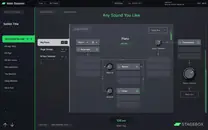
Purpose and Design
StageBox is built to solve the complexity of live software hosting. Created by Matt Robertson with Jules Storer, it targets keyboardists who find tools like Mainstage or Ableton Live too cumbersome. The design prioritizes ease of use and efficiency, offering a clutter-free interface that shows only what is needed for the current task.
As a standalone host, it does not require a traditional DAW, simplifying stage setup. The software is tailored for live performance, with a focus on quick navigation and reliable operation. Its development leverages JUCE and Tracktion Engine technology, which provides a robust foundation for hosting audio plugins in a live context.
Key Capabilities
StageBox can host both VST3 and Audio Units instruments and effects. You can build songs from layers or splits of these instruments, allowing you to combine sounds creatively. A notable feature is the ability to share instruments across multiple songs, which speeds up set construction and ensures consistency.
Effects can be applied per sound or per song, giving you flexible processing options. The software supports multiple MIDI controllers and can route different sound layers to separate hardware audio outputs, enabling complex live setups. Setlist management is drag-and-drop, so arranging and rearranging songs is straightforward and visual.
Workflow and Use
The typical workflow starts by loading your preferred VST3 or Audio Units plugins into StageBox, then assigning them to zones or layers to form a song. You can organize these songs into sets, which represent your performance setlist. The at-a-glance UI allows you to see the entire structure and make adjustments on the fly.
MIDI controller assignments and audio routing are managed within the software, and you can customize these to match your hardware configuration. This makes it easy to adapt to different stage setups. When you need to tweak a live set, you simply drag songs into a new order, and the changes apply immediately.
Practical Applications
StageBox is suited for keyboard players in cover bands, tribute acts, or original projects who need to switch sounds quickly during a performance. It is practical for scenarios ranging from solo piano sets to complex multi-keyboard rigs with splits and layers. For example, you can send a bass sound to a subwoofer and a piano sound to the main mix simultaneously.
The software frees you from the limits of hardware keyboards by using a modern laptop’s processing power, giving access to a vast palette of sounds. You can create custom control mappings for effects and instruments, making it adaptable to any stage scenario, large or small. It is also useful for rehearsal and soundcheck, allowing you to prepare your rig fully beforehand.
Key features
- Hosts VST3 and Audio Units software instruments and effects
- Tailored for live performance: create, adapt, manage, and rearrange setlists
- Build songs from layers or splits of software instruments
- Share instruments between songs for quick set preparation
- Apply effects per sound or per song
- Clutter-free layout only shows what you need
- Supports multiple MIDI controllers and audio output routing
Best for
Live keyboard players who want to replace stage pianos with flexible software rigs, using custom VST/AU plugins and needing efficient setlist management and routing.