ZenDAW Cloudkeys is a touch workspace for Windows that maps over 130 Reason key commands to on-screen buttons, enabling touchscreen control of the DAW without drivers or overlays.
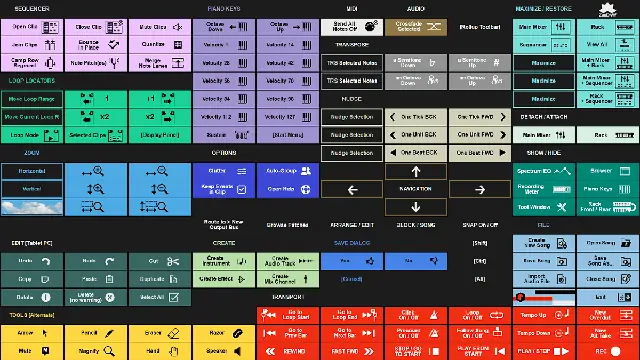
Purpose and Design
Cloudkeys turns a Windows touchscreen into a dedicated Reason control surface, placing commands where users expect them on the display. It is built for Windows 7 and above, operating natively within the OS touch environment without installing any software drivers or overlays inside Reason, which contributes to its stability.
The workspace adapts to monitor size and includes three presets (Cloudkeys, Alt 1, Alt 2) to suit different workflows. It is intended for full HD touchscreens, typically 16 to 24 inches, though larger displays have been used successfully. It can also be operated with a regular mouse on a non-touch monitor.
Command Coverage
The system provides pre-mapped access to more than 130 Reason functions, organized into clearly labeled menus with color codes and icon buttons for quick recognition. Commands span transport controls, sequencer editing, file operations, navigation, zoom, nudge, and editing tools, as well as window toggles for the mixer, rack, sequencer, browser, tool window, and recording meter.
Specific actions include quantize, bounce in place, merge note lanes, mute clips, transpose notes, move loop range, and send all notes off. Users can also browse patches, create tracks, route audio to new output buses, and manage save dialogs directly from the touch workspace.
Workflow and Usability
Cloudkeys is designed to preserve creative flow by reducing the need to search through menus or memorize shortcuts. Commands are positioned logically on the screen, and gesture assignments cover common tasks like toggling between arrange and edit modes, block and song views, and snapping. The layout is customizable through presets, allowing users to prioritize frequently used functions.
Because it uses Windows’ built-in touch OS environment, no additional setup or coding is required. The template automatically adapts to the monitor’s resolution, making installation straightforward—users simply load it and start controlling Reason from the touchscreen or mouse.
Practical Applications
Cloudkeys is suited for music producers and sound designers who work with Reason on a Windows touchscreen and want to speed up editing and mixing tasks. It is especially useful for live performance, quick song arrangement, or any session where rapid access to transport and sequencer functions is needed.
The workspace covers file management, patch browsing, and track creation, making it practical across the entire production process. For users with larger touchscreens, it also offers an ergonomic alternative to traditional keyboard shortcuts, though it is not designed for non-FHD devices like Android or iPad tablets.
Key features
- Over 130 pre-mapped Reason commands accessible by touch
- No drivers or overlays installed within Reason
- Adapts automatically to touchscreen monitor size
- Includes three workspace presets (Cloudkeys, Alt 1, Alt 2)
- Color-coded buttons and icons for easy memorization
- Full transport, sequencer, and file operation coverage
- Operates on Windows 7 and above
Best for
Best for Reason users on Windows touchscreens who want a stable, driver-free control surface to accelerate editing, mixing, and navigation. It is ideal for producers who prefer touching the screen over using a mouse and need quick access to a wide range of DAW commands without coding or complex setup.