ZenDAW Wings is a touchscreen workspace for Windows that brings over 170 pre-mapped Bitwig Studio actions to your fingertips, preserving creative flow with an intuitive, driver-free interface.
Purpose and Core Design
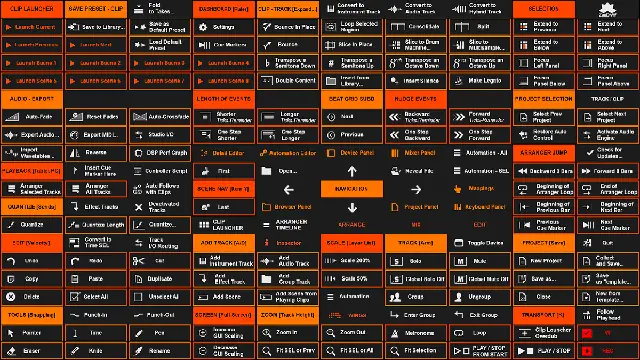
Wings turns a Windows touchscreen into a dedicated controller for Bitwig Studio, placing essential commands exactly where you expect them. It leverages Windows’ built-in touch capabilities, eliminating extra drivers or overlays, which promotes stability and a natural feel. The workspace adapts automatically to your monitor size and includes two elegant layouts, Wings and Wings Alt, to match personal workflows.
Designed for Full HD touchscreens, it also works with larger displays and can be operated with a mouse on standard monitors. Running natively within Windows, it avoids the instability of other touch controllers and requires no coding or installation steps beyond the template itself.
Key Capabilities
With over 170 pre-mapped actions, Wings covers a wide range of Bitwig functions. These include clip and scene launch, track conversion to instrument, audio, or hybrid, transport controls, zooming, track scaling, and navigation across arrange, mix, and edit windows. Toggling detail, automation, device, and mixer panels is also supported.
Dedicated menus handle audio settings, export, add tracks, editing, quantize, nudge events, transpose, save, solo and mute. Full transport functions such as play, stop, record, follow playback, automation write, and metronome click are included, along with Clip Launcher Overdub and Arranger Loop.
Workflow Enhancements
Wings preserves artistic inspiration by streamlining technical interactions. Gesture assignments mimic common commands, allowing fluid actions like launching clips, converting tracks, and scaling tracks without breaking creative momentum. Commands are positioned intuitively, reducing the need to hunt through menus.
Smart color codes, clear menu titles, and personalized button icons make commands easy to memorize. Additional controls include project selection, audio engine activation, GUI scaling, and computer keyboard note input, all designed to speed up daily tasks and keep the focus on music creation.
Practical Applications
Ideal for producers and performers using Bitwig on touch-enabled Windows devices, Wings suits studio sessions, live performances, and quick editing. It runs on Windows 7 and above and requires Bitwig Studio 3.0.0 or newer, with automatic adaptation to your touchscreen size.
A 16-24 inch Full HD touchscreen is recommended for optimal use, though larger screens work well. Since it operates natively within Windows’ touch environment, it offers a stable alternative to other touch controllers without extra software installation.
Key features
- Over 170 pre-mapped Bitwig Studio touch actions
- Native Windows touch integration, no drivers or overlays
- Two elegant workspaces: Wings and Wings Alt
- Automatic adaptation to touchscreen monitor size
- Full transport functions, including record, overdub, and automation write
- Clip Launcher and track conversion to instrument, audio, or hybrid
- Smart color codes and personalized button icons for easy memorization
Best for
Musicians and producers who want a stable, intuitive touchscreen controller for Bitwig Studio on Windows, especially those performing live or seeking a faster editing workflow with immediate access to common commands.