Traktor Play is a streamlined DJ software from Native Instruments, offering essential mixing tools, pro-grade effects, and stem separation in an easy-to-use package for all skill levels.
Purpose and Core Mixing
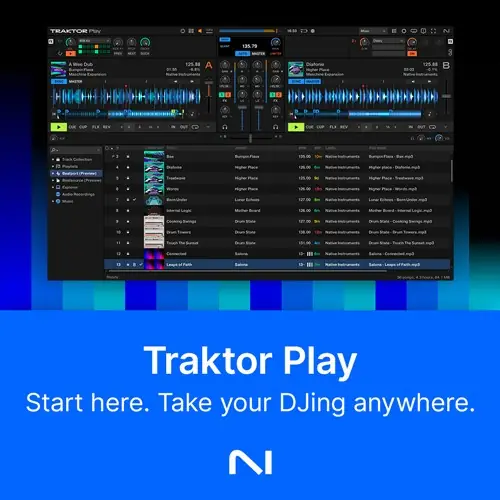
Traktor Play serves as an accessible entry point into the Traktor DJ ecosystem, designed for performers who want core mixing capabilities without the complexity of the full-featured Traktor Pro 4. It provides full control over two decks, making it suitable for both beginners and experienced DJs seeking a simplified workflow.
The software includes essential tools for track manipulation, such as waveform scrubbing, loop length adjustment, key control, level monitoring, and tempo nudging or syncing. Volume faders allow for manual blending, while AutoMix offers a hands-free option for automated transitions, ensuring flexibility in live performance settings.
Key Capabilities and Effects
Traktor Play integrates professional-grade audio processing, including a master limiter to prevent distortion and a sync engine with key detection to maintain harmonic mixing. These features help keep tracks aligned and transitions smooth, leveraging Native Instruments’ reputation for reliable sound quality in live environments.
Sound sculpting is streamlined with a single control for cutting lows or highs and adding filtered delay. Additionally, studio-grade reverb, delay, and gater effects are included, allowing users to craft distinctive sounds. The 808 drum kit from the Pattern Player enables rhythmic layering, adding energy and variety to performances.
Performance Tools and Workflow
The software enhances live creativity with hot cues, hot loops, and Flux Mode, enabling DJs to jump to key moments, insert loops on demand, or build tension before a drop. Flux Mode allows for flexibility in cue points while maintaining playback sync, supporting dynamic mashups and remixing.
A streamlined version of Traktor’s advanced stem separation is included, permitting real-time track reworking by muting drums with a single button at any point. This feature is useful for on-the-fly remixing and extending tracks, making the workflow efficient for club sets or mobile DJ gigs.
Practical Applications
Traktor Play is ideal for mobile DJs, club performers, and hobbyists who need a portable, focused mixing solution. Its two-deck setup and essential tools suit small venues, private events, or practice sessions, while the stem separation and effects cater to creative sets without overwhelming the user.
The software is also a stepping stone for those considering Traktor Pro 4, as an upgrade path is available where users pay only the difference. This makes it a practical choice for DJs who want to start with core features and expand later, ensuring a smooth transition to advanced capabilities.
Key features
- Full control of two decks for mixing and blending
- Waveform scrubbing, loop length adjustment, and key control
- AutoMix mode for hands-free automated transitions
- Pro-grade master limiter to prevent distortion
- Sync engine with key detection for seamless transitions
- Studio-grade reverb, delay, and gater effects
- Hot cues, hot loops, and Flux Mode for live creativity
Best for
Traktor Play is best for DJs who want a simplified, reliable mixing tool for live performances or practice, with essential features like effects, stem separation, and loop control. It suits those who may upgrade to Traktor Pro 4 later, as the upgrade pricing is prorated.