A standalone cross-platform application for importing, checking, playing back, and burning DDP 2.00 images and Cue Sheets, with support for Enhanced CDs and RedBook compliance verification.
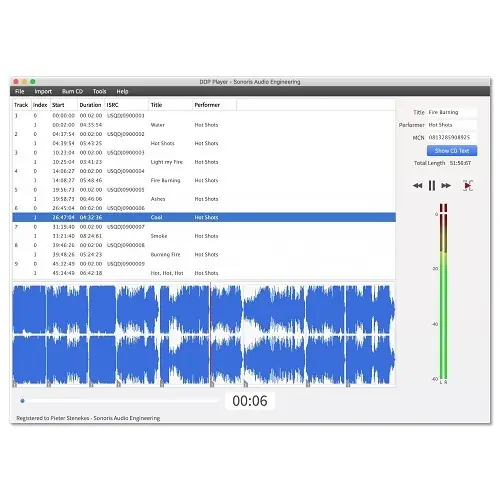
Purpose and Core Function
The DDP Player is a standalone application that imports DDP 2.00 image sets and Cue Sheet files for playback or for creating RedBook-compatible audio CDs. It can load DDP filesets created by other software, including Bias Peak Studio (XT), Sonic Studio HD, SADiE, Sequoia, or Pyramix.
The application supports DDP 1.0x and 2.00 images, as well as Pyramix .pmi and CD Architect CD images. It reads all PQ codes, ISRC, MCN, and CD-Text data, and displays time in either disc time or track time. A dedicated Check Project function tests the imported project against a set of RedBook specification rules.
Key Capabilities
The DDP Player supports Enhanced CDs, which contain an extra data session alongside audio. This data session (typically images, videos, or text) is visible on a computer as an additional drive when the CD is opened. The player handles the separate data session format, which is the most common and compatible.
Additional capabilities include MD5 checking for file integrity, import of zip files containing DDP images, continuous playback of tracks, and the ability to audition gaps. It also provides peak meters and supports drag-and-drop of DDP zip files.
Workflow and Export
Users can export audio files with variable naming conventions, for example using track names. ISRC codes are embedded in exported WAV files following the MPG/EBU standard. The player supports automatic file tagging for FLAC, MP3, and M4A files using CD-Text data.
The application includes MP3 and AAC encoding up to 320 kbps, and allows burning audio CDs directly. It also offers RedBook compliance checking and can export a PQ sheet as PDF. Automatic updates and easy online license activation are provided, and a USB drive based license activation is available for offline computers.
Practical Applications
The DDP Player is useful for mastering engineers, replication plants, and quality control technicians who need to verify DDP image files before manufacturing. It allows thorough checking of PQ codes, ISRC, and CD-Text, ensuring RedBook compliance.
It is also valuable for creating reference audio CDs from DDP images, auditioning track order and gaps, and preparing files for distribution. The Enhanced CD support allows checking mixed-mode discs, and the export features facilitate creating deliverables. A universal iOS version (iPad and iPhone) with DropBox support is included.
Key features
- Import DDP 1.0x and 2.00 image files (loadback) and Cue Sheets
- Supports Pyramix .pmi and CD Architect CD images
- Enhanced CD support for data sessions
- MD5 checking and drag-and-drop of zip files
- MP3 and AAC encoding up to 320 kbps, automatic tagging using CD-Text
- RedBook compliance checking and PQ sheet PDF export
- Audio CD burning and continuous playback
Best for
Ideal for audio professionals who need to verify DDP images before replication, create reference CDs, check RedBook compliance, or export files with embedded metadata from master projects.