Standalone DDP Creator Pro is a cross-platform audio CD authoring and DDP image editing tool. It assembles RedBook CDs, edits PQ/ISRC/CD-Text, imports/exports DDP 2.00, burns/rips CDs, supports Enhanced CDs, and offers vinyl mastering modes.
Purpose and Overview
DDP Creator Pro is a standalone application for creating and editing DDP image filesets, which are the industry standard for delivering master CDs to replication plants. It works with virtually any DAW by importing audio files or cue sheets, allowing you to assemble a RedBook-compatible CD without leaving your preferred editing environment.
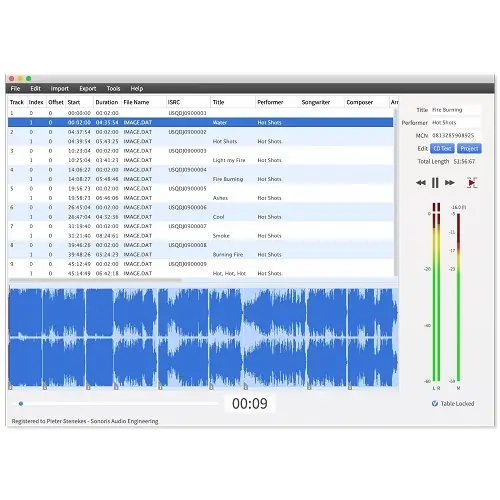
The software handles the complete workflow from dropping mastered 16-bit WAV or AIF files onto the workspace, setting track order, adjusting gaps, and auditioning transitions. You can then edit PQ points, ISRC, MCN, and CD-Text data, and finally export to DDP, Cue Sheet, or burn a CD, with the option to print a PQ sheet.
Key Capabilities
A core strength is its import functionality. You can load back DDP filesets created by other software like Bias Peak Studio, Sonic Studio HD, SADiE, Sequoia, or Pyramix, verify all metadata, edit the project, and re-export or burn. It also imports Cue Sheets from Wavelab, CD Architect image files, and Pyramix PMI files, plus direct CD ripping.
The Pro version adds Enhanced CD (CD Extra) support, letting you attach an ISO file with computer data (images, videos, text) as a separate session. This session appears as an extra drive on computers while playing as a normal audio CD on standard players. You can also add data to an existing DDP fileset.
Workflow and Editing
The workflow is straightforward: start with mastered audio files, arrange them, set precise gaps with audition, then define all subcodes. For vinyl, the Pro version features a dedicated mastering mode. Selecting a track as the start of side B splits the project into sides A and B, and a stereo phase correlation meter helps avoid cutting issues.
Exporting a vinyl project produces two audio files (one per side) in 16, 24, or 32-bit WAV, AIF, or FLAC, plus a PDF tracklist to send to the cutting plant. Adding side C and D enables double album export. This makes it a complete tool for both CD and vinyl mastering delivery.
Practical Applications
Best for mastering engineers and production houses that need to deliver DDP filesets or CDs from any DAW. It replaces expensive DDP add-ons by offering import from a range of formats and direct export. Ideal for verifying incoming DDP images from clients, making last-minute edits, and delivering error-free masters.
The vinyl mode suits cutting engineers who need phase-safe stereo masters per side. Enhanced CD support is useful for creating promotional or special editions that include bonus data. The FTP export simplifies sending images to replication plants, making the whole process efficient and reliable.
Key features
- Import and export of DDP 2.00 images, Cue Sheets, and direct CD rip
- RedBook CD authoring with gap adjustment and transition audition
- Editable PQ points, ISRC, MCN, and CD-Text data
- Enhanced CD support with ISO file attachment (Pro)
- Vinyl mastering mode with side A/B split, phase meter, and multi-bit export
- Generates PDF tracklist for vinyl cutting
- Burns audio CDs and sends images via FTP
Best for
Mastering engineers, CD production facilities, and vinyl cutting services that need a standalone, DAW-agnostic tool to author, verify, edit, and deliver RedBook CDs and DDP filesets, including Enhanced CDs and vinyl masters.