An AI-powered DAW that separates audio into individual notes and harmonics for detailed editing, repair, and sound design.
Core Editing
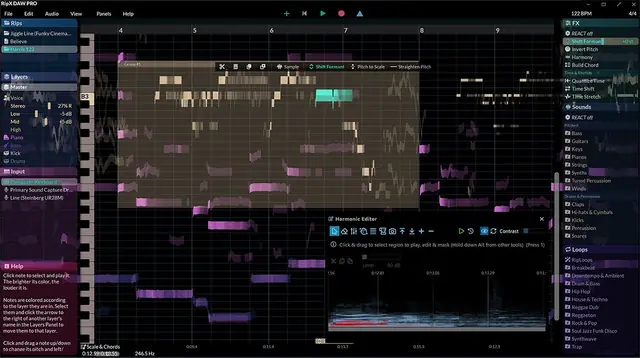
RipX DAW Pro 8 is an AI-driven digital audio workstation that transforms audio into editable notes and unpitched sounds. It provides tools to adjust pitch, time-stretch, copy, paste, and edit individual notes or groups. You can also draw new notes, split or join them, and clone characteristics like vibrato, timbre, volume, and panning between notes.
The software includes a Draw Pitch tool for fine pitch adjustments and slides, an Apply Pattern tool for adding fluctuations, and a Smooth Region tool to blend note attributes. These features enable detailed corrective work, such as fixing individual guitar strings or balancing note volumes. The note-based interface offers instant visual feedback, making pitch and time edits transparent and efficient.
Harmonic Control
The Harmonic Editor goes beyond basic spectrum editing by allowing direct manipulation of the harmonics that define a note’s sound. You can adjust overtone levels, regenerate fundamental harmonics to restore bass presence, and remove noise or change timbre. This provides surgical precision for cleaning up audio and crafting unique timbres.
This capability is useful for separating overlapping sounds that are difficult to isolate with traditional spectral tools. By working at the harmonic level, you can access unintended notes, such as knocks or breaths, and remove or reuse them. You can also blend sounds or create new tones from existing harmonics, enabling creative sound design.
Repair and Cleanup
The DAW offers live audio repair features for removing background noise, reducing hums, and purifying pitched and unpitched sounds. It can digitize crackly vinyl, clean up acapellas with noise, and extract artifact-free dialogue from footage. The tools address common issues like traffic, wind, and crowd noise.
These repairs are effective even when frequencies overlap, as the AI separation identifies individual sounds. You can purify vocals or instruments, and adjust harmonic content to fix problems introduced during mixing. The result is cleaner audio suitable for restoration or post-production work.
Workflow and Automation
RipX DAW Pro 8 integrates with major DAWs via the RipLink VST3/ARA2 and AudioSuite plugin, allowing efficient collaboration. For advanced users, RipScripts enables writing custom tools within the DAW to automate edits, design workflows, or create new audio processes. This programmability supports creative experimentation.
You can also edit audio to video (macOS only) and use the Sound panel for Foley replacement. RipScripts can process data files, such as motion capture, to generate or adjust sounds. This makes the DAW suitable for sound designers, editors, and producers seeking deep control and customization.
Key features
- AI-based separation into notes and harmonics
- Harmonic Editor for overtone and fundamental adjustment
- Audioshop tools including Draw Pitch, Clone, and Smooth Region
- Live repair for noise, hum, and artifact removal
- RipScripts scripting language for custom tools
- RipLink plugin for integration with major DAWs
- Natural pitch correction with Pitch To Scale
Best for
Best for audio editors, sound designers, and producers who need detailed repair, harmonic manipulation, and creative sound reshaping. It handles messy recordings, vinyl cleanup, vocal isolation, and experimental sound creation, especially when traditional spectral editors are insufficient.