Energy Panner 2 is a loudness-controlled audio effect that turns sound intensity into automated movement, creating dynamic pans without manual automation, ideal for stereo and multichannel mixes.
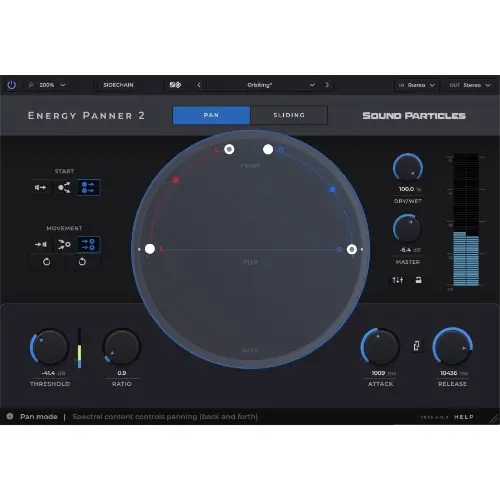
Purpose and Core Concept
Energy Panner 2 is designed to simplify panning by using the loudness of your audio to drive motion. It listens to the intensity of the sound and translates that into panning movements, eliminating the need to draw automation curves by hand. This makes it a responsive tool that adds life to tracks with minimal effort.
Instead of programming every movement, the plugin reacts to the actual volume of the audio, producing organic results that feel natural. It works in plain stereo as easily as in 3D audio, allowing you to animate sounds in a way that is both dynamic and intuitive, with every feature aimed at automating movement based on loudness.
Key Capabilities
The plugin allows you to create independent paths for every input channel, each with its own start and end point. This gives you granular control over how each channel moves in your mix. For real-time visualization, you can choose from three views: a Circular view, a Polygon view, and a Room view, making it easy to follow the sound’s journey.
To mix within the plugin, there is a built-in mixer to balance the volume of each output channel, similar to the workflow in Beat Panner. A Virtual Center feature lets you clear the center channel for dialogue or lead instruments, distributing that content to the left and right speakers, which is useful for widening the soundstage.
Workflow and Configuration
Energy Panner 2 is designed to fit into professional workflows, offering support for a wide range of multichannel setups. The expanded input and output support means it can be used in more sessions and configurations than before, from simple stereo to complex immersive environments.
If you need a speaker setup that isn’t predefined, you can define a custom format. This includes specifying the channel count, azimuth, elevation, and LFE placement, giving you full control over the spatial layout. This makes the plugin highly adaptable for specialized mixing scenarios where standard configurations are not enough.
Practical Applications
This tool is ideal for adding movement to static elements, such as background textures, risers, or even musical phrases, without manual automation. It excels in creating dynamic, evolving pans that respond to the dynamics of the performance, making it a valuable asset for music producers seeking organic results.
In sound design and post-production, the Virtual Center feature is particularly helpful for clearing the center channel, which can benefit dialogue or lead instruments. The custom format support also makes it useful for immersive audio projects, where you need precise control over speaker placement and panning behavior in a 3D space.
Key features
- Loudness-controlled panning for automatic motion
- Independent paths for each input channel
- Multiple views: Circular, Polygon, and Room
- Built-in mixer for output balance
- Virtual Center to clear and redistribute center content
- Custom speaker formats: channel count, azimuth, elevation, LFE
- Multichannel input and output support
Best for
Best for sound designers, music producers, and immersive audio engineers who need to add dynamic, loudness-reactive panning to their mixes without manual automation, and for those working in stereo or complex multichannel speaker configurations.