Blue Cat Audio’s Remote Control is a virtual MIDI control surface that lets you monitor and manage multiple MIDI-controllable plugins or hardware from one customizable interface, with flexible mapping and automation.
Purpose and Core Concept
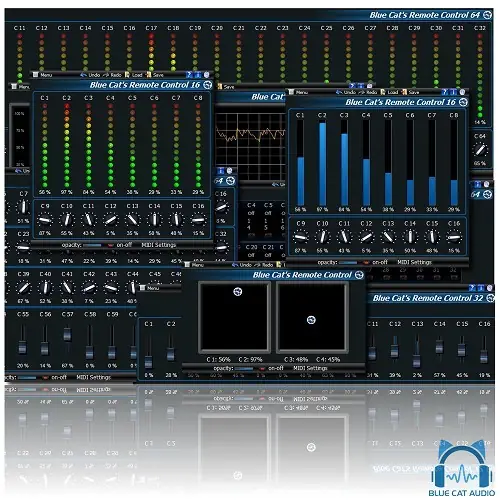
Blue Cat Audio’s Remote Control is a plugin designed to act as a central hub for controlling and monitoring any MIDI-controllable plugin or external device in real time. It addresses situations where the native user interface of a plugin is cumbersome, a hardware device has a complex control layout, or a project contains many plugins that would benefit from unified control from a single custom interface.
The plugin provides a customizable surface with a variety of controls—knobs, faders, switches, joysticks, and meters—each assignable to specific MIDI channels and controller (CC) numbers. You can adjust the response curve of each control, and choose from 30 built-in skins or create your own, making it possible to design a personal interface for your entire DAW and hardware setup.
Key Capabilities and Customization
Beyond simple control mapping, Remote Control can be manipulated via incoming MIDI, allowing you to remap and transform MIDI messages—for instance, changing one CC to another, or altering response curves and MIDI channels. This enables complex routing setups and lets you adapt hardware or software to your preferred workflow.
The plugin includes MIDI Learn for easy assignment of controls, and offers full MIDI control and automation support. You can record output parameters as automation curves or send MIDI CC messages to other plugins, which is useful for creating sidechain effects. The interface supports transparency and zoom, and the plugin has a Smooth Bypass feature for noiseless activation or deactivation.
Workflow and Integration
In a typical workflow, you insert Remote Control on a track or in a project, then use MIDI Learn to map physical controllers or other on-screen controls to the plugin’s parameters. Each assigned control can be customized for response, and you can save presets for instant recall via MIDI commands. The plugin also supports undo/redo and copy/paste of its state between instances.
Remote Control can transform automation lanes into MIDI CC messages, allowing you to use DAW automation to drive external hardware or other plugins. It also features a full-featured integrated presets manager, making it easy to organize and switch between different control configurations. The plugin is available in AAX Native, Audio Units, VST2, and VST3 formats for Mac and Windows, with no CPU load when idle.
Practical Applications
This tool is particularly useful for live performance and studio sessions where you need to control multiple plugins or synths from a single surface. For example, you could create a custom interface that maps to various parameters across different plugins, then save it as a preset for a specific project or performance set. It also serves as a MIDI remapper for adapting hardware controllers to different software.
In a mixing context, you can use Remote Control to group controls from multiple plugins into one window, making adjustments easier and more visual. The ability to send MIDI CC from automation opens up creative possibilities, such as using a volume automation lane to modulate a filter frequency on a synth. Its low CPU overhead makes it practical for large projects.
Key features
- Virtual MIDI control surface and monitoring
- Real-time control or monitoring of MIDI-controllable plugins or devices
- 30 built-in skins with controls and meters (knobs, faders, switches, joysticks)
- Customizable response curves and MIDI learn
- Undo/redo and copy/paste state between instances
- Smooth bypass and no CPU load on idle
- Full MIDI control, automation output, and presets manager
Best for
Best for producers and sound designers who want to consolidate control of multiple MIDI-controllable plugins or hardware into a single, custom interface, as well as for those who need to remap MIDI messages or use automation to drive external gear.