A Windows application that turns a touchscreen into a dedicated control surface for Cubase and Nuendo, offering over 300 pre-mapped commands without installing drivers or overlays.
Purpose and Design
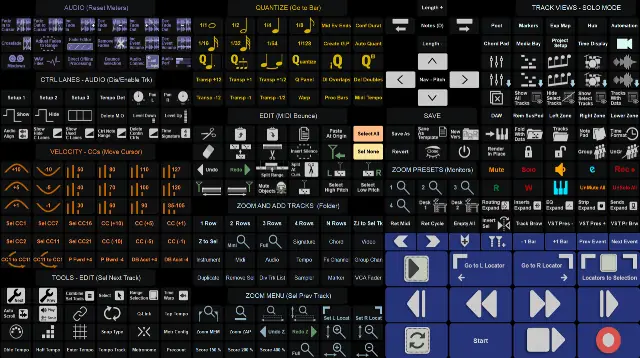
ZenDAW serves as a direct touchscreen control solution for Steinberg’s Cubase and Nuendo DAWs. It is built for Windows 7 and above, with an interface that places over 300 common key commands and functions where users naturally expect them on a touch display. The entire system operates within Windows’ native touch environment, requiring no additional drivers or overlays inside the DAW.
This approach aims to provide stability while reducing the learning curve. Commands are organized into well-structured menus with color codes and personalized icons to aid memorization. Users can control transport, editing, and mixing functions directly from a monitor, preserving creative flow by minimizing the need to switch between keyboard and mouse.
Key Capabilities
The software includes over 300 pre-mapped actions covering transport, editing, zoom, quantize, and more. Ready-to-use gesture assignments handle common tasks like select, zoom, and hide or show channels. It also provides nine toolbar presets, allowing users to tailor the interface to their preferred workflow, from creative sessions to precise editing tasks.
Additional features encompass retrospective MIDI recording, VST preset browsing, and a section for controls such as audio, add tracks, edit, and velocity. Templates automatically adjust to screen size, ensuring usability across different touchscreen monitors. Full transport functions are present, including start/stop, record, playlist navigation, and marker handling.
Workflow and Operation
ZenDAW integrates with Cubase 9 and Nuendo 10 or later. Users touch on-screen buttons to trigger commands, eliminating the need for complex macro setup. The workflow is designed to be intuitive: find a command in a logical menu, tap it, and the action executes. Touch gestures cover frequent operations, reducing repetitive mouse clicks and keyboard shortcuts.
The absence of driver installation within Cubase or Nuendo simplifies setup. Users can start working immediately after connecting a compatible touchscreen monitor. The system is stable because it relies on Windows’ built-in touch support, and the interface’s visual design aims to make long sessions more comfortable and efficient.
Practical Applications
ZenDAW suits music producers, composers, and audio engineers who prefer a tactile approach to DAW control. It is especially useful in studio environments where a touchscreen monitor is readily available, enabling quicker navigation of large projects. The toolbar presets and gesture support are beneficial during creative writing or when editing MIDI and audio in detail.
This tool also aids in live recording sessions, where quick access to transport and recording functions matters. For those new to Cubase or Nuendo, the visual layout can help them learn key commands faster. It is not designed for mobile use but stays fixed to a desk where a dedicated touchscreen is positioned.
Key features
- Over 300 pre-mapped Cubase and Nuendo actions
- Built into Windows touch environment, no drivers inside DAW
- 9 elegant toolbar presets for different workflows
- Transport controls, including record, loop, and marker navigation
- Gesture assignments for select, zoom, and channel hide or show
- Templates automatically adjust to monitor size
- Color-coded menus and icons for easy memorization
Best for
Musicians and audio professionals using Cubase 9 or Nuendo 10 on Windows who want to leverage a touchscreen monitor for faster, more intuitive control over their DAW, especially in a fixed studio setup.